
Every time a browser asks a server for something, the server answers with a three-digit number. Most of the time you never see it — you only notice when something breaks.
This is the complete reference: every standard HTTP status code, plus the non-standard ones Cloudflare and Nginx return, organised by class. Each entry says what the code means, whose problem it is, and what to do about it.
Use it as a lookup. If you arrived with a specific number in mind, the tables below are grouped by first digit.
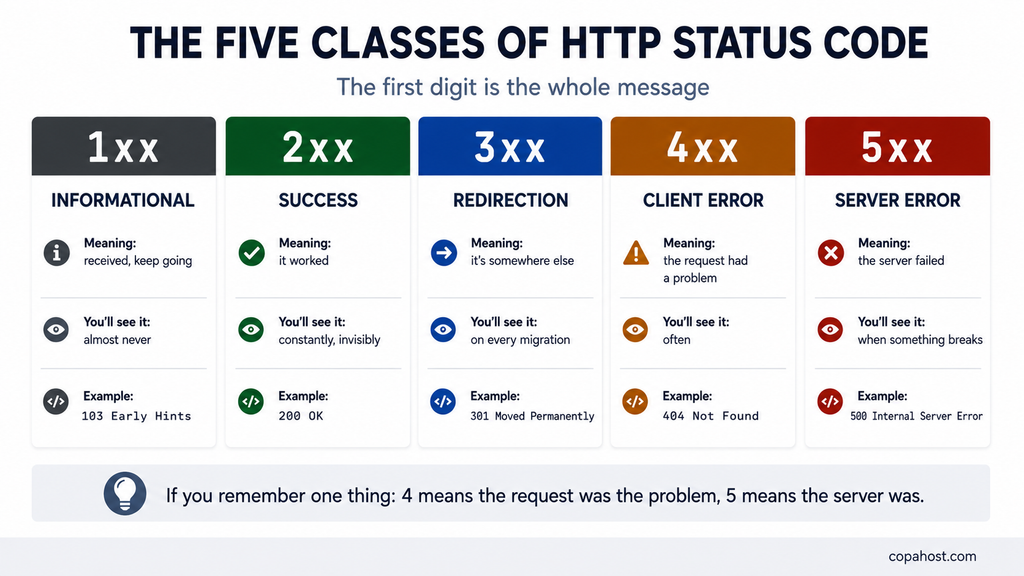
| 1xx | Informational — the request was received, keep going |
| 2xx | Success — it worked |
| 3xx | Redirection — it’s somewhere else now |
| 4xx | Client error — the request had a problem |
| 5xx | Server error — the server failed |
Table of Contents
How to read a status code
The first digit is the whole message. The other two identify the specific case.
If you remember only one thing, remember this: codes starting with 4 mean the request was the problem; codes starting with 5 mean the server was.
⚠️ And a caveat that catches people out: the class names are conventions, not guarantees. A 404 can be caused entirely by a server misconfiguration, despite being a “client error” — the classification describes where the problem was detected, not always who caused it.
1xx — Informational
You will almost never see these. They’re intermediate responses, handled by the browser before any content arrives.
| Code | Name | What it means |
|---|---|---|
| 100 | Continue | Headers received, send the body |
| 101 | Switching Protocols | Changing protocol — usually to WebSocket |
| 102 | Processing | WebDAV — still working, don’t time out |
| 103 | Early Hints | Preload resources while the response is prepared |
103 is the one worth knowing about. It lets the server tell the browser which resources to start fetching before the page itself is ready — a real performance win, and increasingly supported.
2xx — Success
The request worked. You see these constantly and never notice them.
| Code | Name | What it means |
|---|---|---|
| 200 | OK | The normal successful response |
| 201 | Created | A new resource was created — common in APIs after a POST |
| 202 | Accepted | Received, but processing hasn’t finished |
| 203 | Non-Authoritative Information | Success, but a proxy modified the response |
| 204 | No Content | Worked, and there’s nothing to return |
| 205 | Reset Content | Worked — clear the form |
| 206 | Partial Content | Part of the file — used by downloads and video streaming |
| 207 | Multi-Status | WebDAV — multiple results in one response |
| 208 | Already Reported | WebDAV — this was already listed |
| 226 | IM Used | The response is a delta of a previous one |
⚠️ 204 catches people out in APIs. A DELETE that succeeds often returns 204, and code expecting a JSON body finds nothing — which looks like failure but isn’t.
⚠️ A 200 is not proof that anything worked
This is the trap in the whole class, and it catches monitoring setups constantly.
A 200 means the server delivered a response. It says nothing about whether that response was correct.
Three ways a 200 lies:
JavaScript failed silently. The HTML arrived, the status was 200, and the page rendered blank because a script threw an error after load.
An API returned an error inside a success. Plenty of APIs answer 200 OK with a body reading {"error": "invalid token"}. The transport succeeded; the operation didn’t.
A form rejected the input. “Invalid credentials” is a page like any other, and it’s delivered with a 200.
Why this matters: a monitor that only checks status codes reports everything as healthy while the site is broken. Pair status checks with content checks — look for a string that should be on the page, not just for the number 200.
3xx — Redirection
The resource is somewhere else. This class matters more for SEO than any other.
| Code | Name | What it means | Passes SEO value? |
|---|---|---|---|
| 300 | Multiple Choices | Several options exist — rare | — |
| 301 | Moved Permanently | Moved for good | Yes, nearly all |
| 302 | Found | Temporarily elsewhere | Stays on the original |
| 303 | See Other | Look here instead, with GET | No |
| 304 | Not Modified | Nothing changed — use your cache | — |
| 305 | Use Proxy | Deprecated, ignored by browsers | — |
| 307 | Temporary Redirect | Temporary, method preserved | Stays on the original |
| 308 | Permanent Redirect | Permanent, method preserved | Yes |
The distinction that matters: 301 and 308 are permanent and transfer ranking; 302 and 307 are temporary and don’t. Using 302 for a permanent move is one of the most common SEO mistakes there is.
And 304 is invisible but important. It’s how browser caching works — the server saying “you already have this, use your copy”. A site with poor caching returns 200 where it could return 304, and pays for the bandwidth.
Sample response:
HTTP/1.1 301 Moved Permanently
Location: https://example.com/new-page
Cache-Control: max-age=31536000
Which redirect code to use
The resource moved permanently → 301
It moved permanently and the method must survive → 308
It moved temporarily → 302
It moved temporarily and the method must survive → 307
Nothing changed since the client last asked → 304
⚠️ The “method must survive” part is the subtlety. With 301 and 302, some clients convert a POST into a GET when following the redirect. With 307 and 308, they don’t — which matters for APIs and form submissions, and not at all for ordinary web pages.
4xx — Client errors
The largest class, and the one you’ll actually meet.
| Code | Name | What it means | Whose problem |
|---|---|---|---|
| 400 | Bad Request | Malformed request | Whoever built the request |
| 401 | Unauthorized | Authentication required | You — log in |
| 402 | Payment Required | Reserved, rarely used | — |
| 403 | Forbidden | Authenticated, but not permitted | The administrator |
| 404 | Not Found | Nothing at this address | Either side |
| 405 | Method Not Allowed | Wrong verb — POST where GET expected | The developer |
| 406 | Not Acceptable | Can’t produce the format requested | The developer |
| 407 | Proxy Authentication Required | Like 401, but for a proxy | You |
| 408 | Request Timeout | You took too long to send it | Your connection |
| 409 | Conflict | Conflicts with the current state | The developer |
| 410 | Gone | Deleted deliberately, not coming back | The site owner |
| 411 | Length Required | Missing Content-Length header | The developer |
| 412 | Precondition Failed | A condition in the headers wasn’t met | The developer |
| 413 | Content Too Large | Upload exceeds the limit | Configuration |
| 414 | URI Too Long | The URL is too long | The developer |
| 415 | Unsupported Media Type | Wrong content type | The developer |
| 416 | Range Not Satisfiable | Requested range doesn’t exist | The developer |
| 417 | Expectation Failed | Expect header couldn’t be met | The developer |
| 418 | I’m a teapot | An April Fools’ joke from 1998, still in the spec | Nobody |
| 421 | Misdirected Request | Sent to a server that can’t answer | Configuration |
| 422 | Unprocessable Content | Understood, but semantically wrong | The developer |
| 423 | Locked | WebDAV — resource is locked | — |
| 424 | Failed Dependency | WebDAV — a previous request failed | — |
| 425 | Too Early | Replay risk — try again later | — |
| 426 | Upgrade Required | Must switch protocol | The developer |
| 428 | Precondition Required | Server requires a conditional request | The developer |
| 429 | Too Many Requests | Rate limit hit | You — slow down |
| 431 | Request Header Fields Too Large | Headers exceed the limit — often too many cookies | Configuration |
| 451 | Unavailable For Legal Reasons | Blocked by law or court order | Neither |
The four you’ll actually encounter
404 Not Found — the most famous status code in existence. The server works, and there’s nothing at that address.
401 and 403 — constantly confused. 401 means “identify yourself”, and logging in fixes it. 403 means “no, whoever you are” — logging in changes nothing. Our guides to HTTP 401 and 403 Forbidden cover each one in depth.
429 Too Many Requests — rate limiting. Increasingly common as sites defend against scrapers and AI crawlers.
413 Content Too Large — the upload limit. It can be set by Nginx, Apache, ModSecurity, Cloudflare or PHP, and our guide shows how to find which one is blocking you. On WordPress, PHP’s upload_max_filesize and post_max_size are usually part of the fix — our guide on PHP limits covers where to change them.
And two with a story
418 I’m a teapot comes from the Hyper Text Coffee Pot Control Protocol, an April Fools’ RFC from 1998. When the IETF proposed removing it in 2017, the objection was loud enough that it stayed. Some servers still return it, entirely as a joke.
451 Unavailable For Legal Reasons is named after Fahrenheit 451, Ray Bradbury’s novel about book burning. It signals content blocked by legal order rather than technical failure — and it exists specifically so that censorship is visible rather than disguised as an error.
5xx — Server errors
The server failed. As a visitor, there’s usually nothing you can do.
| Code | Name | What it means | Common cause |
|---|---|---|---|
| 500 | Internal Server Error | Something broke, no detail given | Almost anything |
| 501 | Not Implemented | The server doesn’t support this method | Configuration |
| 502 | Bad Gateway | An upstream server sent an invalid response | PHP-FPM down, backend crashed |
| 503 | Service Unavailable | Temporarily unable — overload or maintenance | Traffic spike, maintenance mode |
| 504 | Gateway Timeout | An upstream server didn’t answer in time | Slow backend, slow query |
| 505 | HTTP Version Not Supported | Protocol version refused | Rare |
| 506 | Variant Also Negotiates | Configuration loop in content negotiation | Misconfiguration |
| 507 | Insufficient Storage | WebDAV — out of space | Disk full |
| 508 | Loop Detected | Infinite loop in processing | Redirect or WebDAV loop |
| 510 | Not Extended | Further extensions required | Very rare |
| 511 | Network Authentication Required | Log into the network first | Captive portal — hotel or airport Wi-Fi |
The three that matter
500 Internal Server Error is the one that says nothing. It’s the server’s way of admitting something failed without naming it — and the only reliable way to find out is the error log. Our guide on the 500 error covers the diagnosis.
502 vs 504 are constantly confused, and the distinction is simple: 502 means the upstream answered with garbage; 504 means it didn’t answer at all. One is a broken backend, the other is a slow one.
503 is the polite one. It usually means maintenance or overload, and it’s the correct code to return during planned downtime — because it tells search engines to come back later rather than deindex the page.
⚠️ A practical note on 503: always send a Retry-After header with it. Without one, crawlers guess.
Which code should you return?
The tables above explain what each code means when you receive it. This is the other direction: what to send when you’re the one answering.
Success200 for a normal successful response. 201 when you created something — with a Location header pointing at it. 204 when it worked and there’s nothing to return, which is the correct answer to most DELETE requests.
The client’s fault400 for malformed input — and include which field failed, because “Bad Request” alone helps nobody. 401 when authentication is missing or invalid. 403 when it’s present and insufficient. 404 when the resource doesn’t exist. 422 when the request was well-formed but semantically wrong.
Your fault500 when something broke unexpectedly — and log the detail, because you’re deliberately not sending it. 503 when a dependency is down, such as a database connection failure, with a Retry-After header. 504 when an upstream call timed out.
⚠️ The mistake worth naming: returning 200 with an error message in the body. It’s common, it’s convenient, and it breaks every monitoring tool, retry mechanism and cache between you and the client.
Non-standard codes you’ll still meet
These aren’t in the HTTP specification, but you’ll see them in the wild.
Cloudflare
| Code | Name | What it means |
|---|---|---|
| 520 | Unknown Error | The origin returned something Cloudflare couldn’t parse |
| 521 | Web Server Is Down | The origin refused the connection |
| 522 | Connection Timed Out | The origin didn’t respond in time |
| 523 | Origin Is Unreachable | Cloudflare can’t route to the origin — often DNS |
| 524 | A Timeout Occurred | The origin connected but never finished responding |
| 525 | SSL Handshake Failed | TLS negotiation with the origin failed |
| 526 | Invalid SSL Certificate | The origin’s certificate couldn’t be validated |
All seven mean the same thing at heart: Cloudflare is fine, and your origin server isn’t. The fix is always on your server, never on Cloudflare.
521 is the most common, and it’s the Cloudflare equivalent of connection refused — the web service is down, or the firewall is blocking Cloudflare’s IPs.
Nginx
| Code | Name | What it means |
|---|---|---|
| 444 | No Response | Nginx closed the connection without answering — used to drop malicious requests |
| 494 | Request Header Too Large | Headers exceeded the buffer |
| 495 | SSL Certificate Error | Client certificate invalid |
| 496 | SSL Certificate Required | Client certificate missing |
| 497 | HTTP Sent to HTTPS Port | Plain HTTP request on an HTTPS port |
| 499 | Client Closed Request | The visitor gave up before the server finished |
499 is the most informative of these. A lot of them in your logs means pages are slow enough that people leave before they load — which is a performance signal, not an error.
Which codes matter for SEO
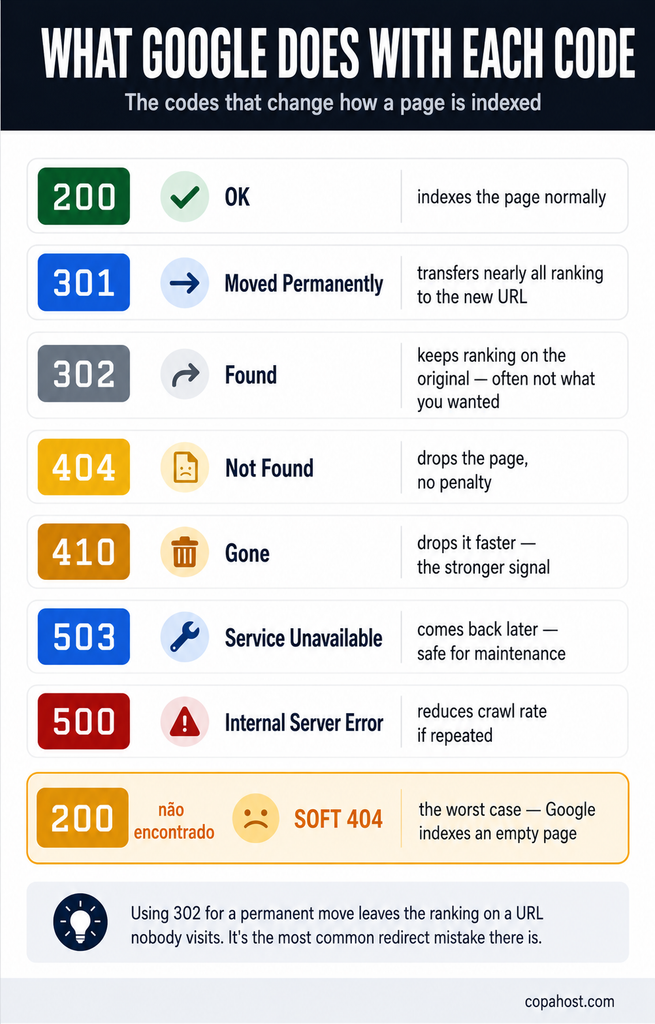
Search engines treat these codes as instructions, and getting them wrong has consequences.
200 — the page is fine, index it.
301 and 308 — the content moved permanently. Google transfers nearly all ranking signals to the new address, and eventually drops the old one from the index.
302 and 307 — temporary. Google keeps the original indexed and doesn’t transfer signals. Using 302 for a permanent move means the ranking stays on a URL nobody visits.
404 and 410 — the page is gone. 410 is the stronger signal, telling Google the removal was deliberate; 404 leaves room for it to be a mistake. Neither is penalised — Google has said repeatedly that 404s are a normal part of the web.
503 — come back later. The correct code for planned maintenance, because it protects the page from being deindexed.
500 — something’s broken. Repeated 500s across a site reduce crawl rate, because Google backs off from servers that appear unstable.
One file plays by its own rules: robots.txt. The status code of /robots.txt decides how Google crawls the entire site. A 404 means “no restrictions” — Google crawls everything. A 5xx or a 429 makes Google treat the whole site as off-limits until the file is reachable again. Check what your robots.txt allows, URL by URL, with our robots.txt tester.
⚠️ And the worst case isn’t in this list: the soft 404. A page that shows “not found” to the visitor while returning 200 to the server. Google can’t tell it apart from real content, so it indexes an empty page and wastes crawl budget on it.
How to check the status code of any URL
In the browser: press F12, go to the Network tab, reload, and the status appears next to each request.
On the command line:
curl -I https://example.comTo follow redirects and see every hop:
curl -sIL https://example.com | grep -i "^HTTP\|^location"That second command is the one worth remembering. It shows the entire redirect chain — and if you see two 301s before the 200, you have a chain worth flattening.
Every server error on this page is diagnosable from the error log — and plenty of hosts don’t give you one. Copahost plans include full access and error logs, cPanel to manage redirects and custom error pages, free SSL, and support that reads the log with you when the answer isn’t obvious. From €1.99/month, with free migration.
See hosting plansFrequently asked questions
How many HTTP status codes are there?
The IANA registry lists around 63 standard codes across five classes, defined mainly in RFC 9110. On top of those, individual servers and services define their own — Cloudflare uses 520 to 526, and Nginx uses 444 and 494 to 499. In practice, about ten codes account for nearly everything you’ll ever see.
What’s the difference between 4xx and 5xx?
4xx means the request had a problem — wrong address, missing authentication, malformed data. 5xx means the server failed while trying to handle a valid request. As a visitor you can sometimes fix a 4xx; a 5xx is almost always out of your hands.
What’s the difference between 301 and 302?
301 is permanent — search engines move the page’s ranking to the new address. 302 is temporary — the original URL stays indexed and keeps its ranking. Using a 302 for a move that’s actually permanent is one of the most common SEO mistakes.
What’s the difference between 401 and 403?
401 means you haven’t identified yourself — logging in resolves it. 403 means the server refuses you whoever you are — logging in changes nothing, and the fix requires an administrator.
What’s the difference between 502 and 504?
502 means the upstream server answered with something invalid; 504 means it didn’t answer at all within the timeout. One is a broken backend, the other is a slow one — and the fixes differ accordingly.
Which status codes affect SEO?
301 and 308 transfer ranking signals to the new URL. 302 and 307 don’t. 404 and 410 remove pages from the index without penalty, with 410 being the stronger signal. And 503 protects a page during maintenance by telling crawlers to return later. The most damaging is the soft 404 — a “not found” page returning 200.
Should I use 404 or 410 for deleted pages?
410 if the removal is deliberate and permanent, because it’s the stronger signal and Google acts on it faster. 404 if the page might come back, or if you’re unsure. Neither is penalised, and neither should be redirected to the homepage — Google treats that as a soft 404.
What is a soft 404?
A page that displays “not found” to the visitor while returning 200 OK to the server. Search engines can’t distinguish it from real content, so they index an empty page and waste crawl budget on it. Google Search Console reports these separately, and they’re worth fixing.
What does 429 Too Many Requests mean?
You’ve hit a rate limit — too many requests in too short a time. It’s increasingly common as sites defend against scrapers and AI crawlers. The response often includes a Retry-After header saying how long to wait; slowing down, rather than retrying immediately, is the fix.
What are the Cloudflare 5xx codes?
Codes 520 to 526, and they all mean the same thing at heart: Cloudflare is working and your origin server isn’t. 521 means the origin refused the connection, 522 means it timed out, 525 and 526 are TLS problems. The fix is always on your server.
What does status code 499 mean?
It’s a non-standard Nginx code meaning the client closed the connection before the server finished responding — the visitor gave up and left. A lot of 499s in your logs is a performance signal rather than an error: pages are slow enough that people don’t wait.
What is a 418 status code?
“I’m a teapot”, from an April Fools’ RFC published in 1998 defining a Hyper Text Coffee Pot Control Protocol. When the IETF proposed removing it in 2017, the objection was loud enough that it stayed in the registry. Some servers still return it as a joke.
What does 451 mean?
Unavailable For Legal Reasons — content blocked by law or court order rather than by technical failure. It’s named after Ray Bradbury’s Fahrenheit 451, and it exists so that legal blocking is visible instead of being disguised as an ordinary error.
How do I check what status code a URL returns?
curl -I https://example.com shows the headers including the status. To see an entire redirect chain, use curl -sIL https://example.com | grep -iE "^HTTP|^location" — it lists every hop, which reveals redirect chains worth flattening.
Conclusion
Status codes are the vocabulary the web uses to say what happened. Most of them you’ll never meet — but the ten that matter explain almost every problem you’ll encounter running a website.
Three ideas cover most of it. The first digit is the message: 4 means the request, 5 means the server. 301 and 308 transfer ranking; 302 and 307 don’t — and confusing them is the most expensive mistake in this list. And the code is the symptom, not the diagnosis — a 500 tells you something broke, and only the error log tells you what.
Bookmark this page for the lookup, and remember the curl command for the rest:
curl -sIL https://example.com | grep -iE "^HTTP|^location"It shows every hop between a request and its answer — which is, most of the time, exactly the thing you needed to see.
