
Every time you see a padlock in your browser, buy something online, or install a “SSL certificate” on your site, you’re relying on one of these two protocols. They’re spoken about as if they’re the same thing — people say “SSL” constantly — but technically, SSL has been dead for years, and what actually protects your connection today is TLS. So why does everyone still say SSL?
This guide clears it up: the real difference between SSL and TLS, the full version history, why SSL was retired, what changed with TLS 1.3, and — the part that confuses most people — why the word “SSL” stuck around long after the protocol itself was gone.
Quick answer: SSL (Secure Sockets Layer) was the original protocol for encrypting web traffic. TLS (Transport Layer Security) is its successor and what every secure connection uses today. All versions of SSL are deprecated and insecure; the current standards are TLS 1.2 and TLS 1.3. When someone says “SSL certificate” or “SSL connection” in 2026, they almost always mean TLS — the name simply stuck.
Table of Contents
The short version
- SSL is the ancestor; TLS is what runs today. SSL came first (1990s), TLS replaced it (1999 onward).
- All SSL versions are deprecated. SSL 2.0 and 3.0 are disabled in every modern browser and server because of unfixable security flaws.
- TLS 1.2 and 1.3 are the current standards. Anything older (TLS 1.0/1.1) is also deprecated.
- The name never updated. “SSL certificate,” “SSL connection” — the industry kept the old word even though the technology moved on to TLS.
- The certificate is the same either way. An “SSL certificate” and a “TLS certificate” are the identical X.509 file; only the protocol negotiated at connection time differs.
What is SSL?
SSL (Secure Sockets Layer) was developed by Netscape in the mid-1990s to encrypt data moving between a browser and a web server — protecting things like passwords and credit card numbers from being read in transit. It went through three versions: SSL 1.0 (never publicly released due to security flaws), SSL 2.0 (1995), and SSL 3.0 (1996).
SSL was groundbreaking for its time and made e-commerce possible. But it was built on cryptographic foundations that didn’t hold up, and by the mid-2010s every version had been broken and retired.
What is TLS?
TLS (Transport Layer Security) is the successor to SSL, introduced by the IETF in 1999 to fix SSL’s weaknesses while improving speed and encryption strength. It does the same job — encrypting the connection between client and server — but does it far more securely.
TLS has gone through four versions: TLS 1.0 (1999), TLS 1.1 (2006), TLS 1.2 (2008), and TLS 1.3 (2018). Today, TLS 1.2 and TLS 1.3 are the only versions still considered safe and in active use; the rest are deprecated. TLS is now the universal standard for HTTPS, email, VPNs, and almost any encrypted internet communication.
Why “SSL” is still the word everyone uses
Here’s the source of nearly all the confusion. By the time SSL was being retired, it had already become the generic word for “web encryption.” Certificate vendors sold “SSL certificates,” tutorials said “install SSL,” and the term was everywhere. When TLS took over under the hood, the marketing vocabulary never caught up.
So today the language and the technology are out of sync, and that’s fine to know rather than fight:
- “SSL certificate” → it’s actually a TLS certificate (an X.509 file — the format is identical either way).
- “SSL connection” / “SSL encryption” → the connection is secured with TLS.
- “SSL/TLS” → people write both to be safe; they mean the same modern thing.
SSL vs TLS: the version timeline
Each release fixed flaws in the one before it. Here’s the full history and where each version stands today.
How they actually differ
Beyond the name, TLS improved on SSL in every meaningful way:
- Stronger cryptography. TLS dropped the weak, “export-grade” ciphers SSL was forced to support and added modern, robust algorithms.
- A more secure handshake. The handshake — the negotiation that sets up the encrypted channel — was redesigned to close the holes attackers exploited in SSL.
- Forward secrecy. TLS 1.3 mandates perfect forward secrecy, meaning that even if a server’s private key is stolen later, past recorded sessions can’t be decrypted. SSL offered no such protection.
- Speed. TLS 1.3 cut the handshake to a single round trip (and can skip it entirely on repeat connections), so secure connections are faster than they ever were under SSL.
If you want the mechanics of that handshake — and what happens when it fails — see our guide to the ERR_SSL_PROTOCOL_ERROR, which is the error browsers show when a TLS handshake breaks.
What comes after TLS 1.3?
TLS isn’t standing still. The next frontier is post-quantum cryptography — encryption designed to survive attacks from future quantum computers, which could one day break the key-exchange math that protects today’s connections. Browsers and servers have already begun rolling out hybrid post-quantum cipher suites in TLS 1.3, and the “harvest now, decrypt later” threat (where attackers record encrypted traffic today to crack it once quantum hardware matures) is pushing adoption faster than many expected. It won’t change how you use SSL/TLS day to day, but it’s why keeping your server’s TLS stack current matters more than ever. We cover this shift in depth in post-quantum cryptography and what it means for your hosting.
How the TLS handshake works
Everything SSL and TLS do starts with the handshake — the quick negotiation that happens before any real data moves, where the browser and server agree on how to encrypt the conversation and the browser verifies the server’s identity. Understanding it makes the whole SSL-vs-TLS difference click into place.
In simplified terms, a TLS handshake goes like this: the browser sends a ClientHello (the TLS versions and cipher suites it supports), the server replies with a ServerHello (the version and cipher it picked) plus its certificate, the browser verifies that certificate against a trusted authority, the two sides exchange keys to establish a shared secret, and from that point on the connection switches to fast symmetric encryption for the actual page data. If any step fails — no shared protocol, an invalid certificate, a broken key exchange — the browser aborts and you see an error like ERR_SSL_PROTOCOL_ERROR.
The big change over time is how many round trips the handshake takes — and it’s the main reason modern HTTPS feels faster than the SSL era. A round trip (RTT) is one full back-and-forth between browser and server, and each one adds latency, especially on mobile or distant connections.
- TLS 1.2 needs two round trips (2-RTT). The hello exchange takes one, the key exchange takes another, and only then can data flow.
- TLS 1.3 needs one (1-RTT). It streamlines the negotiation so the browser can start sending encrypted data after a single round trip — roughly halving the setup delay.
- TLS 1.3 adds 0-RTT resumption. When a browser reconnects to a server it has talked to before, it can resume the session with zero round trips, sending data in the very first message. (It’s a slight security trade-off for repeat visits, which is why it’s used selectively.)
In practice, that means a TLS 1.3 site completes its security setup in about half the time of a TLS 1.2 site — invisible per request, but meaningful across the many connections a page makes.
Why SSL was retired
SSL wasn’t deprecated for being old — it was deprecated because its flaws were structural and unfixable. The clearest example is POODLE (2014), an attack that exploited a core weakness in SSL 3.0: it let attackers force a connection to downgrade to SSL 3.0 and then decrypt sensitive data like session cookies. There was no patch — the only real fix was to disable SSL entirely, which browsers and compliance standards (like PCI DSS) went on to require. Earlier attacks like BEAST had already shown the same pattern. SSL’s design simply couldn’t be made safe, so it was replaced rather than repaired.
What this means for your website
Do you need to “switch from SSL to TLS”? Almost certainly not. This is the most common worry, and the answer is reassuring: if your site already loads over HTTPS with a valid padlock, you’re already using TLS — there’s nothing to migrate. SSL-vs-TLS isn’t a setting you flip; it’s handled by your server’s configuration, which on any modern host already negotiates TLS automatically. The only thing worth checking is that your server offers modern TLS (1.2 and 1.3) and has the old versions disabled — and on a well-managed host, that’s the default. In other words, “moving from SSL to TLS” already happened years ago, under the hood, without you doing anything.
For a site owner, the SSL-vs-TLS distinction turns into a few concrete rules:
- You still buy a “SSL certificate” — that’s fine, it’s the industry term. What matters is that your server uses it with TLS.
- Enable TLS 1.2 and TLS 1.3, disable everything older. This is the correct production configuration in 2026: modern browsers block SSL and old TLS anyway, and serving only modern protocols avoids handshake failures and compliance problems.
- Send all traffic to HTTPS. Once your certificate is active, force every visitor onto the secure version with a permanent redirect, so no one lands on the unencrypted
http://page — typically done with a 301 redirect at the server level. - Keep TLS 1.2 alongside 1.3 for now. TLS 1.3 is faster and cleaner, but 1.2 remains widely compatible — running both gives the best balance of security and reach.
- A misconfigured or outdated protocol shows up as an error. If your server only offers obsolete versions, modern browsers refuse to connect — surfacing as errors like ERR_SSL_PROTOCOL_ERROR or ERR_SSL_VERSION_OR_CIPHER_MISMATCH.
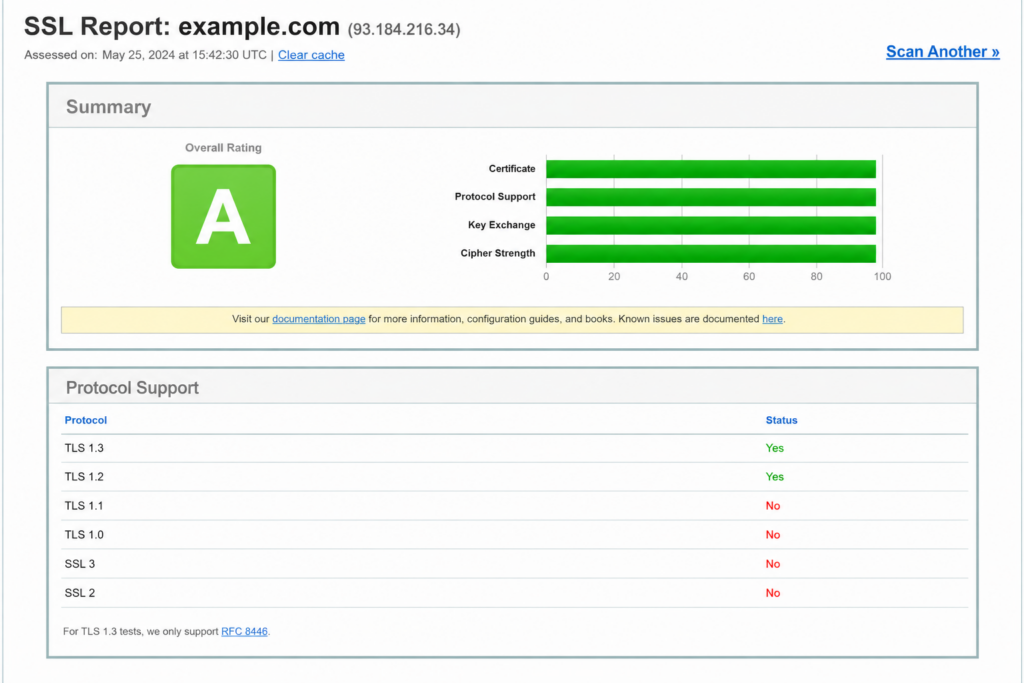
The simplest path is a host that issues SSL/TLS certificates, renews them automatically, and keeps modern TLS enabled by default — so you get the padlock without hand-configuring protocols. (For how the padlock and HTTPS fit together, see our guide to HTTP vs HTTPS.)
Frequently asked questions
Is SSL the same as TLS? Not exactly — TLS is the successor to SSL. They do the same job (encrypting a connection), but SSL is the old, deprecated protocol and TLS is the modern, secure one. In everyday language people say “SSL” to mean TLS, because the name stuck.
Is SSL still used today? No. All versions of SSL (2.0 and 3.0) are deprecated and disabled in modern browsers and servers because of serious security flaws. Every secure connection today uses TLS, even when it’s called “SSL.”
What’s the difference between an SSL certificate and a TLS certificate? There’s no difference in the file itself — both are the same X.509 certificate. The term “SSL certificate” is just the industry’s habitual name. The certificate enables encryption; the protocol your server negotiates at connection time (TLS) is what actually secures it.
Which TLS version should I use? Enable both TLS 1.2 and TLS 1.3, and disable SSL and TLS 1.0/1.1. TLS 1.3 is the fastest and most secure; TLS 1.2 is kept on for broad compatibility. This combination is the recommended setup for 2026.
Why do people still say “SSL” if it’s deprecated? Because by the time SSL was retired, it had already become the generic term for web encryption. Vendors and tutorials kept using it, so “SSL certificate” and “SSL connection” persist even though the underlying protocol is now TLS.
Is TLS 1.3 better than TLS 1.2? Yes, in security and speed: TLS 1.3 removes older weak options, requires forward secrecy, and completes the handshake in a single round trip. TLS 1.2 is still secure and more widely compatible with legacy systems, which is why both are commonly enabled together.
No protocol headaches. Copahost hosting includes free SSL/TLS certificates with automatic renewal and modern TLS (1.2 and 1.3) enabled out of the box — so your site gets the padlock and stays secure without manual configuration.
Explore Copahost hostingConclusion
The SSL-vs-TLS question has a clean answer: TLS is what you use; SSL is what it replaced. SSL pioneered web encryption but was retired for unfixable security flaws, and TLS — specifically TLS 1.2 and 1.3 — now secures essentially every encrypted connection on the internet. The only reason “SSL” survives is linguistic habit: it became the generic word for encryption and never got updated. So buy the “SSL certificate,” call it what you like, but make sure your server is actually running modern TLS — that’s what keeps the padlock closed and your visitors’ data safe.
Want encryption that’s set up right by default? Explore Copahost’s hosting — with free SSL/TLS certificates, automatic renewal, and modern TLS enabled out of the box, so your site is secure without the configuration headache.
