
HTTP (Hypertext Transfer Protocol) and HTTPS (Hypertext Transfer Protocol Secure) are two protocols that transmit data over the internet. The primary difference between HTTP vs HTTPS lies in the level of security and encryption they provide.
HTTP and HTTPS are two ways websites send and receive information over the internet.
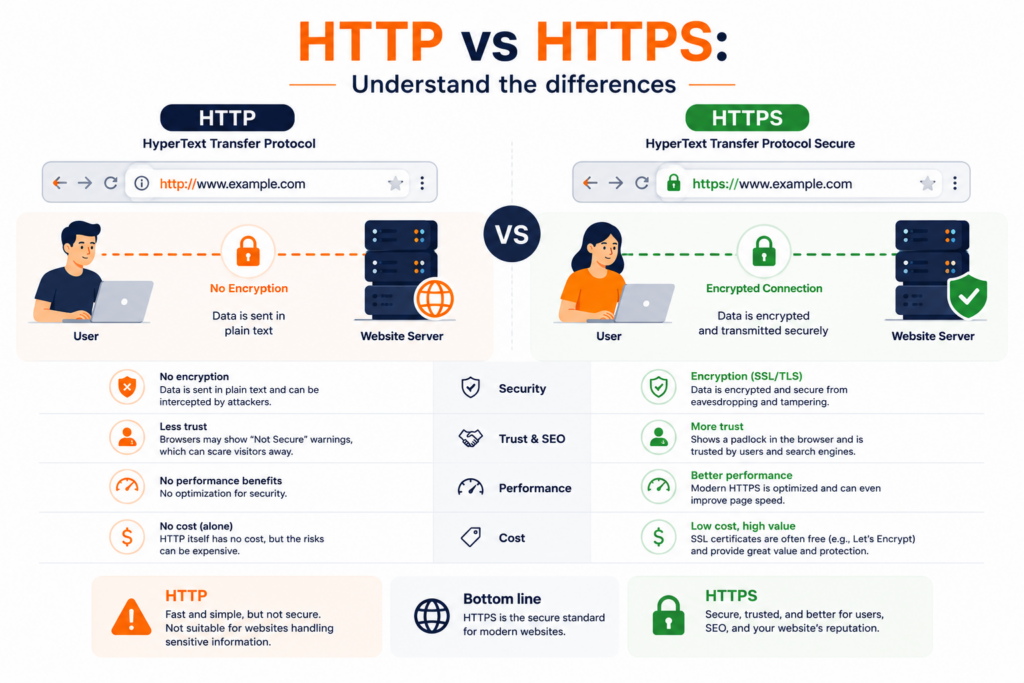
The main difference between them is security.
- HTTP is the older version. It sends data in plain text, without any protection. That means anyone who manages to intercept the connection can read or even change the information. It uses port 80 and is okay for basic websites that don’t handle personal or sensitive data.
- HTTPS, on the other hand, is the secure version. It uses encryption to protect the data, so that no one else can read or change it while it’s being sent. It runs on port 443 and uses special security tools called SSL or TLS certificates.
These certificates are issued by trusted companies and help confirm that the website is real and safe to use. When you see the little padlock icon in your browser’s address bar, that means the site is using HTTPS.
In short:
HTTPS is the safer option, especially for things like passwords, payment details, or personal data.
HTTP is less secure and not recommended for private or sensitive information.
Table of Contents
What is encryption, in one paragraph
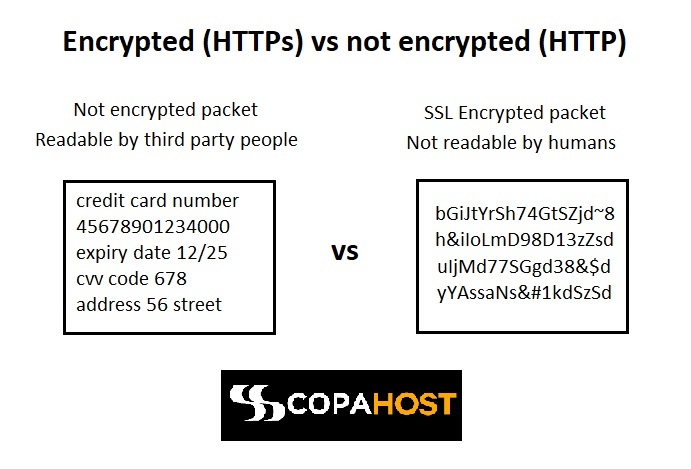
Encryption scrambles readable data (plaintext) into an unreadable form (ciphertext) using a mathematical algorithm and a key, so that only someone holding the correct key can turn it back. It’s the mechanism behind the padlock: when a connection is encrypted, anyone intercepting it sees noise rather than your password. There are two kinds — symmetric encryption, which uses one shared key, and asymmetric encryption, which uses a public/private key pair — and HTTPS uses both together, asymmetric to agree on a key and symmetric to move the actual data. Our guide on symmetric vs asymmetric encryption covers how each works and why HTTPS needs both.
How an HTTPS server works
HTTPS is a secured version of the HTTP protocol. It establishes a secure communication link between the browser and server by encrypting the data. The HTTPS protocol pairs with TLS (transport layer security). It guarantees data privacy for the end-user. Considering the comparison of HTTP vs HTTPS, the HTTPS method is the safest.
Whenever your browser connects to the HTTPS server, the server acknowledges with its certificate. After this, the browser carries out a check for verifying the validity of the certificate. The certificate is valid only if:
- the owner information matches with the server credentials that the user requested for.
- the certificate is signed by a legitimate certification authority.
If any of these conditions fail, the user receives a warning about the problem. For a full explanation of the certificate itself — types, how to get one, and validity — see what an SSL certificate is.
The web servers perform several handshakes when HTTPS is active. That negotiation — the SSL/TLS handshake — is where the encryption keys and identity checks are settled before any page loads.
Firstly, the initial step involves sending a request to the server for verification. If it is the desired one where information is destined to reach, it responds back by sending an acknowledgement message. Thus, after verification of authentic destination, the client sends a hello message. After this, information becomes encrypted and is exchanged via the use of encryption keys or ciphers.
The difference between HTTP vs HTTPS
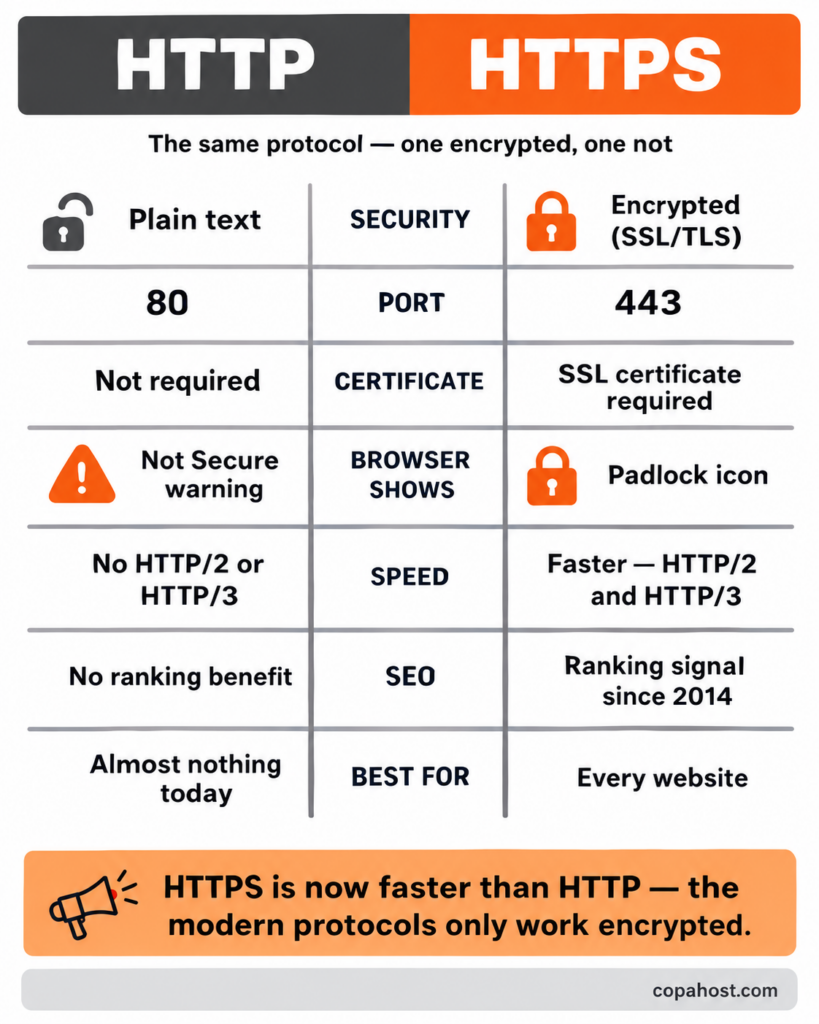
The difference between HTTP and HTTPS comes down to security, but it affects speed, SEO, and user trust too. Here’s the side-by-side:
How to migrate from HTTP to HTTPS
TLS vs SSL
You’ll see both terms used. SSL is the original protocol; TLS is its newer, more secure successor, and it’s what every modern “SSL certificate” actually uses — the name SSL just stuck. For the full comparison, see our guide on SSL vs TLS.
The SSL certificate behind HTTPS
HTTPS works because of an SSL certificate — a small digital file installed on the server that encrypts the connection and verifies the site’s identity. It’s what the browser checks during the handshake, and what produces the padlock. Certificates come in different types and are often free today. For a full explanation, see our dedicated guide on what an SSL certificate is.
Is HTTPS slower than HTTP?
This is an outdated worry. Years ago, the encryption in HTTPS added a tiny overhead. Today the opposite is true: the modern protocols HTTP/2 and HTTP/3, which make sites significantly faster, only work over HTTPS. So in practice an HTTPS site is usually faster than the same site on HTTP, not slower. Combined with the security and SEO benefits, there’s no performance reason to stay on HTTP.
HTTPS and SEO on Google
It’s a tendency to have all the internet running over secure servers. Google confirmed HTTPS as a ranking signal in August 2014, and has strengthened that position since. In other words, it’s very difficult to get good rankings with an HTTP website.
HTTPS is an essential element for SEO (Search Engine Optimization) due to its role in enhancing website security. By encrypting the communication between a user’s browser and a website, HTTPS ensures that sensitive information remains private and cannot be accessed or tampered with by malicious parties. Search engines prioritize user safety, and they reward websites that prioritize security by implementing HTTPS. They will give better search rankings to safe websites.
Trust and credibility are crucial factors in SEO, and HTTPS plays a significant role in building them. When users see the padlock symbol and “https://” in their browser’s address bar, they know that the website they are visiting has taken measures to secure their data. This secure browsing experience fosters trust on the website, encouraging users to engage with the content, make purchases, or provide personal information. Search engines aim to deliver reliable and trustworthy results, so they give preference to websites that prioritize user trust by implementing HTTPS.
Security matters for Google
The adoption of HTTPS can have a positive impact on a website’s search engine rankings. While HTTPS is not the most significant ranking factor, Google considers it a ranking signal. Websites that use HTTPS are more likely to receive a slight boost in search engine rankings compared to their non-secure counterparts. Search engines prioritize delivering the best user experience, and secure websites contribute to that goal. Therefore, implementing HTTPS can help improve a website’s visibility in search engine results.
HTTPS preserves referral data, which is crucial for tracking the sources of website traffic. When the web server directs traffic from an HTTPS website to a non-HTTPS website, the referral isn’t usually present. Browsers and servers usually report this traffic as “direct.”
However, in HTTPS, servers will preserve referral data. That allows website owners to accurately track the sources of their traffic. This information is valuable for understanding the effectiveness of marketing campaigns, optimizing website performance, and making informed decisions to improve SEO strategies. By adopting HTTPS, website owners ensure they have access to accurate referral data and can effectively analyze and optimize their traffic sources.
Which encryption HTTPS actually uses
HTTPS combines the two families in sequence. During the SSL/TLS handshake, asymmetric encryption — a public/private key pair — is used once, to verify the server’s identity and agree on a shared secret. From that point on, symmetric encryption takes over for the actual page data, because it’s far faster and the two sides now share a key.
That combination is the reason HTTPS is both secure and fast: the expensive maths happens once, at the start, and everything after it runs on the cheap algorithm. Our guide on symmetric vs asymmetric encryption breaks down the trade-offs, and the SSL/TLS handshake guide walks through the negotiation step by step.
Vulnerabilities
Both HTTP and HTTPS have their own vulnerabilities. As HTTPS has an extra encryption layer, it’s more secure. Here are some vulnerabilities of each protocol:
HTTP Vulnerabilities:
- Lack of Encryption: HTTP transmits data in plain text, making it vulnerable to interception and eavesdropping. Attackers can easily capture sensitive information, such as passwords or credit card details, while it’s being transmitted.
- Man-in-the-Middle Attacks: Attackers can intercept the communication between the client and the server by placing themselves between them. They can alter or steal data without the knowledge of the parties involved.
- Tampering: As data is transmitted in plain text, attackers can modify the content of HTTP requests or responses. This can lead to unauthorized access, data manipulation, or injection of malicious code.
HTTPS Vulnerabilities:
- Certificate Issues: HTTPS relies on digital certificates to establish trust between the client and the server. If a certificate is compromised, forged, or issued by an untrusted authority, it can lead to security breaches or man-in-the-middle attacks.
- Weak Cipher Suites: The strength of encryption algorithms and cipher suites used in HTTPS can vary. If weak or deprecated algorithms are employed, they may be susceptible to attacks like brute force or decryption.
- Malware and Phishing: While HTTPS protects data during transmission, it doesn’t guarantee the legitimacy of the website itself. Attackers can still use HTTPS to distribute malware or conduct phishing attacks by creating fraudulent websites with valid SSL certificates.
- Server Vulnerabilities: HTTPS doesn’t mitigate vulnerabilities at the server level. If the server hosting the website has security flaws, such as unpatched software or misconfigurations, attackers can exploit those vulnerabilities to gain unauthorized access.
It’s important to note that HTTPS addresses many of the vulnerabilities present in HTTP by encrypting data and providing integrity checks. It’s the recommended protocol for secure communication on the web.
Frequently asked questions
Is HTTP still used?
Yes, but rarely for public websites. HTTP still exists for local testing, internal systems, and legacy setups, but browsers now flag it as “Not Secure,” so virtually every live site uses HTTPS.
Is HTTPS always secure?
HTTPS guarantees the connection is encrypted and the data can’t be intercepted in transit. It does not guarantee the site itself is trustworthy — even phishing sites can have HTTPS. So the padlock means “encrypted,” not “safe to trust.”
Is HTTPS free?
It can be. Free SSL certificates from Let’s Encrypt, included with most hosting plans, make HTTPS completely free for the vast majority of websites. The one thing to check is renewal: Let’s Encrypt certificates last 90 days, so the process should be automated rather than manual.
Does HTTPS help SEO?
Yes. Google confirmed HTTPS as a ranking signal in 2014, and secure sites also benefit from faster modern protocols (HTTP/2, HTTP/3) and preserved referral data — all of which support SEO.
What’s the difference between HTTPS and SSL?
HTTPS is the secure protocol used to transfer web pages; SSL (really TLS today) is the certificate and encryption technology that makes HTTPS secure. HTTPS is the result; the SSL/TLS certificate is what enables it.
Why does my site show “Not Secure” even with a valid SSL certificate?
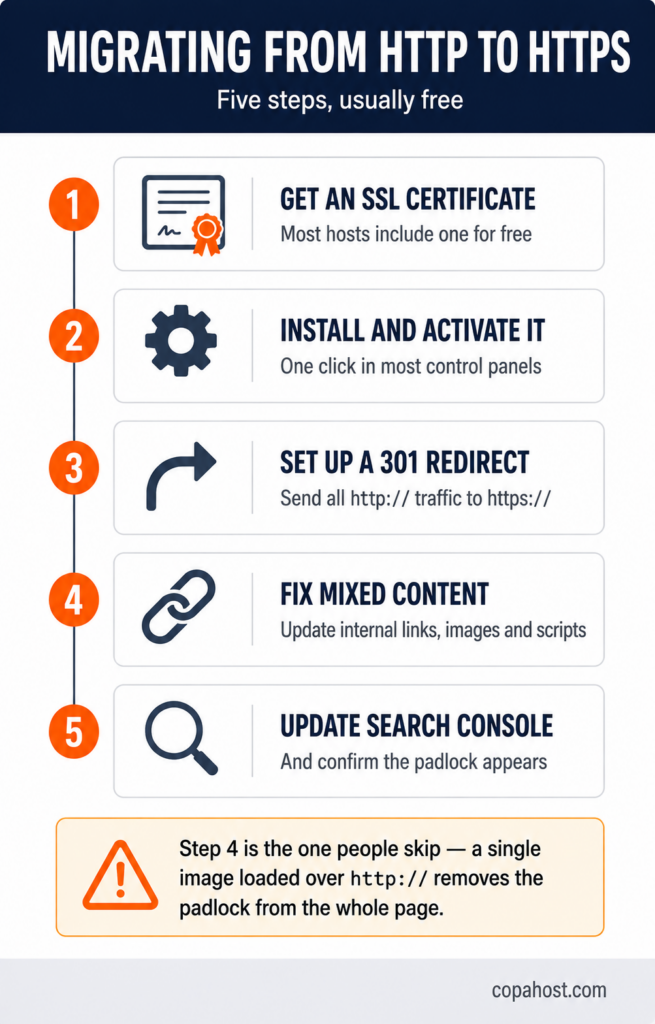
Usually mixed content: the certificate is fine, but some element on the page — an image, a script, a font — is still loading over http://. A single one is enough for the browser to drop the padlock. The browser console names the exact resource at fault.
Can I switch back to HTTP after migrating?
Technically yes, but it would undo everything the migration achieved: browsers would flag the site again, the ranking signal would be lost, and HTTP/2 and HTTP/3 would stop working. There’s no practical scenario where reverting helps a public site.
Does HTTPS slow down my site?
No — the opposite, in practice. The encryption overhead is negligible on modern hardware, and HTTP/2 and HTTP/3, which make sites significantly faster, only work over HTTPS. An HTTPS site is usually faster than the same site on HTTP.
Every Copahost plan includes a free SSL certificate, issued and renewed automatically, with port 443 open and modern TLS enabled. No configuration, no annual certificate bill, no expired-certificate warnings. LiteSpeed servers with NVMe storage and free migration from your current host.
See hosting plans with free SSLConclusion
The difference between HTTP and HTTPS is, at its core, the difference between an open connection and a secured one — but in 2026 it’s no longer a real choice. HTTPS is faster (thanks to HTTP/2 and HTTP/3), it’s rewarded by Google, it’s trusted by visitors, and the SSL certificate that powers it is usually free. HTTP, meanwhile, gets flagged as “Not Secure” and offers no practical advantage for a public site. If your site is still on HTTP, migrating to HTTPS is quick and free — and it’s one of the highest-value, lowest-effort upgrades you can make.
