
An email domain is the part of an email address that comes after the “@” symbol. In john@company.com, the email domain is company.com. It identifies the mail server responsible for sending and receiving messages for that address — and, when it’s your own domain instead of gmail.com or outlook.com, it’s also what makes your email look professional.
Most people use an email domain every day without thinking about it. But if you’re setting up email for a business, choosing between a free address and a custom one, or just trying to understand how email works, the domain is the piece that matters most. This guide explains what an email domain is, the different types, why a custom one matters, and how to get your own.
An email domain is the part of an email address after the @ symbol — for example, company.com in john@company.com. It tells the email system which mail server handles messages for that address. You can use a free shared domain (like gmail.com) or a custom email domain that matches your own website (like john@yourbusiness.com). A custom email domain looks professional and builds trust — and you get one by registering a domain name and connecting it to an email hosting plan.
What is an email domain?
An email domain is the portion of an email address that appears after the @ symbol. Every email address has two parts:
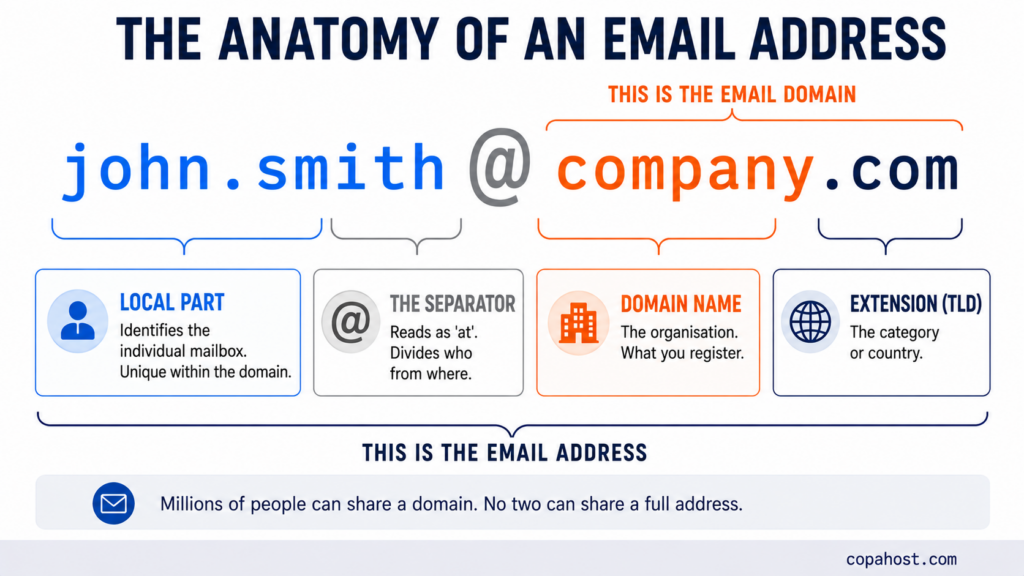
The local part (before the @) identifies the specific mailbox — the individual user. The email domain (after the @) identifies the organization or mail server that handles email for that address. Together they form a unique address that no one else can have.
The email domain is what lets mail servers around the world route a message to the right place. When someone sends an email to john@company.com, their mail server looks up company.com in the DNS to find which server accepts mail for that domain, then delivers the message there. In that sense, the email domain works like the destination on an envelope.
The specific record that answers this is the MX record (Mail Exchanger). It’s published in your domain’s DNS and points to the hostname of the server that accepts mail — something like mail.company.com. A domain can have several, with priority numbers so that mail falls back to a secondary server if the first doesn’t answer.
This is also why email and website can live in completely different places: the A record points browsers at your web server, while the MX record points mail servers somewhere else entirely. Using Google Workspace for email while your site sits on your own hosting is exactly that arrangement.
It’s worth noting that an email domain is simply a domain name used for email. The same company.com that hosts a website can also handle email — the domain does double duty. That’s why, when you register a domain for a website, you can usually use it for email addresses too.
Email domain vs. email address
These two terms are often mixed up, but they’re not the same:
| Term | What it is | Example |
|---|---|---|
| Email address | The full, unique identifier | john@company.com |
| Email domain | Only the part after the @ | company.com |
| Local part | Only the part before the @ | john |
Thousands — even millions — of people can share the same email domain (everyone with a @gmail.com address, for instance), but no two people can have the exact same full email address. The domain is the shared part; the local part is what makes each address unique within that domain.
Types of email domains
Not all email domains are equal. There are three broad categories, and the difference matters a lot for how you’re perceived.
Free shared domains
These are the domains of free email providers: gmail.com, outlook.com, yahoo.com, hotmail.com. Anyone can create an address on them at no cost, which is exactly why they carry no branding — an address like yourbusiness@gmail.com tells the recipient you didn’t set up a professional email. They’re fine for personal use, but weak for business.
If you use one of these and want to set it up in a mail client, see our guide on Hotmail and Outlook.com IMAP settings.
Custom (business) email domains
A custom email domain is your own domain name used for email — you@yourbusiness.com. It matches your website, reinforces your brand on every message you send, and signals that you’re an established operation. This is the standard for businesses of any size, and it’s more affordable than most people expect.
Vanity or subdomain variations
Some organizations use subdomains for specific purposes — news@mail.company.com for newsletters, or a separate domain for transactional email. These are variations on the custom domain, typically used by larger senders to organize or protect their main domain’s sending reputation.
Why a custom email domain matters
Using a custom email domain instead of a free one has concrete benefits beyond looks:
- Professionalism and trust. An address at your own domain tells customers you’re a real, established business. A free address can make even a good company look amateur.
- Brand reinforcement. Every email you send carries your domain — and by extension, your brand — in front of the recipient.
- Control and ownership. You decide how many addresses to create (
sales@,support@,info@), and they belong to you. If an employee leaves, the address stays with the business. - Deliverability and security. With your own domain, you can configure authentication records like SPF, DKIM, and DMARC, which help your messages reach inboxes instead of spam folders — and protect your domain from being spoofed. All three are published as TXT records in your domain’s DNS — though not at the same hostname. Our guide on DNS TXT lookups covers where each one lives and how to check them.
These three records also affect how quickly your mail is accepted. Receivers that can’t verify a sending domain tend to throttle it, which shows up as messages sitting in the queue rather than being rejected outright — our guide on emails stuck in the queue covers that pattern.
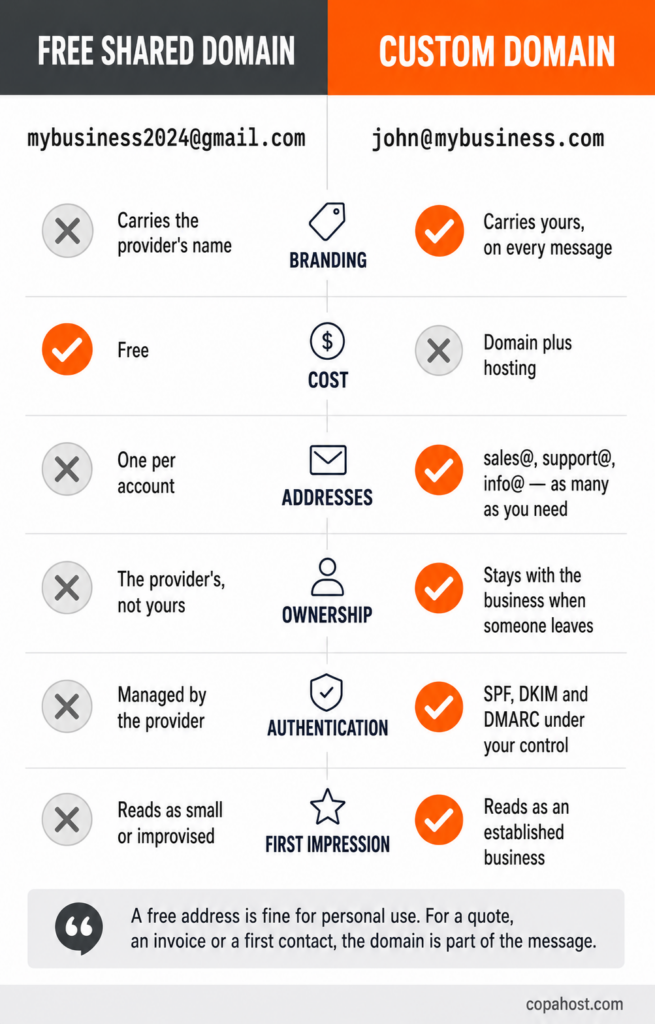
A free address at gmail.com tells a recipient one of two things: either the business is very small, or it didn’t bother. Neither helps when the email is a quote, an invoice or a first contact. The cost of a custom domain is small enough that going without it is a choice, and recipients read it that way.
How to get your own email domain
Getting a custom email domain comes down to two things: a domain name and somewhere to host the email. Here’s the process:
- Choose and register a domain name. Pick a domain that matches your business, then register it through a domain registrar. If you already have a website, you likely already own a domain you can use for email.
- Get an email hosting plan. The domain needs a mail server to actually send and receive email. Most web hosting plans include email hosting, so you can run your website and email on the same domain.
- Create your email addresses. Once the domain is connected to a hosting plan, you create the individual addresses (like
you@yourdomain.com) in the control panel. Our guide on how to create an email account in cPanel walks through this step by step. - Set up your devices. Configure the address in your mail app using IMAP or POP3 for incoming mail and SMTP for outgoing. The full setup for email with your own domain covers this.
The convenient part: when you register a domain together with a hosting plan, both are connected automatically — you don’t have to link them manually. Wondering about cost? IMAP pricing covers what email at your own domain actually costs and how the billing models differ.
Copahost gives you a free domain for the first year with a yearly hosting plan — plus email hosting with IMAP, POP3 and SMTP, so you can run you@yourbusiness.com in minutes.
See hosting plans with emailHow to find the email domain of an address
If you simply want to identify the domain of an email address, it’s the text after the @. In mary@example.co.uk, the email domain is example.co.uk. This is sometimes asked as “what is the domain of an email address” — and the answer is always the same: everything to the right of the @ symbol, including the extension (.com, .org, .co.uk, and so on).
Frequently asked questions
What is an email domain?
An email domain is the part of an email address that comes after the @ symbol. In john@company.com, the email domain is company.com. It identifies the mail server that handles sending and receiving messages for that address, and it’s technically a domain name being used for email.
What is the domain of an email address?
Everything after the @ symbol, including the extension. In contact@example.com the domain is example.com, and in hello@site.co.uk it’s site.co.uk. The part before the @ is the local part, which identifies the individual mailbox.
What is the difference between an email domain and an email address?
The email address is the full, unique identifier — john@company.com. The email domain is only the part after the @ — company.com. Millions of people can share the same domain, but each full address is unique because of the local part before it.
What is an MX record?
The DNS record that tells other mail servers where to deliver messages for your domain. When someone emails john@company.com, their server looks up the MX record for company.com and sends the message to whatever hostname it names. A domain can have several, with priority numbers so mail falls back to a secondary server if the first doesn’t answer.
Can my email and my website be on different servers?
Yes, and it’s common. The A record tells browsers where the website is; the MX record tells mail servers where email goes. They’re independent, so plenty of businesses run their site on one host while using a separate email provider — all on the same domain. Some run the mail server themselves rather than using a provider — our guide on self-hosted email covers what that requires.
Can I create my own email domain?
Yes. Register a domain name, connect it to an email hosting plan, and create the addresses you want. Most web hosting plans include email hosting, and many providers give a free domain for the first year with a yearly plan.
Do I need a website to have a custom email domain?
No. A domain can be used for email alone — you register it, point the MX record at a mail server, and never build a site. It’s a common setup for businesses that operate through social media or marketplaces but still want a professional address.
Is a custom email domain better than Gmail or Outlook?
For business, yes. Free domains carry no branding, give you one address per account, and belong to the provider rather than to you. A custom domain matches your website, lets you create as many addresses as you need, and gives you control over the SPF, DKIM and DMARC records that affect whether your mail reaches the inbox.
Does an email domain cost money?
A custom one requires a domain registration — typically around $5 to $15 per year — plus an email or web hosting plan to run the mail server. Free shared domains like gmail.com cost nothing but carry no branding. Many hosting providers bundle a free domain with a yearly plan.
What happens to my email if the domain expires?
It stops working entirely. Once a domain lapses, its DNS stops resolving, the MX record goes with it, and every address on that domain becomes unreachable — incoming mail bounces and outgoing mail fails. It’s a strong argument for keeping auto-renewal on.
Can I use a subdomain for email?
Yes. Larger senders often use something like news@mail.company.com for newsletters, keeping bulk sending separate from the main domain. That way, if the marketing domain runs into deliverability trouble, the reputation of the main domain isn’t affected.
Conclusion
An email domain is simply the part of an email address after the @ — the piece that identifies where the message goes and who’s behind it. You can use a free shared domain like gmail.com, but for any business the better choice is a custom email domain that matches your own website: it looks professional, reinforces your brand, and gives you full control over your addresses. Getting one is straightforward — register a domain name, connect it to an email hosting plan, and create your addresses. Once that’s done, every message you send works a little harder for your brand.
