
A DNS TXT lookup retrieves the text records attached to a domain — and in practice, that means the entire email authentication stack: SPF, DKIM, DMARC, plus verification tokens for services like Google and Microsoft. The command is simple: dig example.com TXT on Linux or macOS, nslookup -type=TXT example.com on Windows.
But there’s a catch that sends most people in circles: the three email records don’t live in the same place. Only SPF sits at the root domain. DMARC lives at _dmarc.yourdomain.com, and DKIM lives at selector._domainkey.yourdomain.com — which means a TXT lookup on your domain alone will never show them, no matter how correctly they’re configured.
| SPF | dig example.com TXT — root domain |
| DMARC | dig _dmarc.example.com TXT |
| DKIM | dig selector._domainkey.example.com TXT — you need the selector |
| Verification tokens | Root domain, alongside SPF |
Table of Contents
What a TXT record is
A TXT record stores arbitrary text attached to a domain name. It was defined in RFC 1035 back in 1987, originally intended for human-readable notes about a domain — a description, a contact, a comment.
That original purpose barely survived. What happened instead is that TXT became the general-purpose slot for machine-readable configuration: because any system can publish text in DNS and any system can read it, protocols started using TXT records to declare policies and prove ownership.
Today a typical business domain has TXT records carrying:
- SPF — which servers may send mail as your domain
- DKIM — the public key that verifies your mail’s signature
- DMARC — what receivers should do when SPF and DKIM fail
- MTA-STS and BIMI — newer email standards for transport security and logo display
- Verification tokens — proof of ownership for Google Search Console, Microsoft 365, Zoom, Atlassian, and dozens of other services
Our guide on what DNS stands for covers how TXT fits alongside the other record types.
Where each record actually lives
This is the section worth reading carefully, because it explains why so many lookups appear to come back empty.
| Record | Hostname | Starts with |
|---|---|---|
| SPF | example.com | v=spf1 |
| DMARC | _dmarc.example.com | v=DMARC1 |
| DKIM | selector._domainkey.example.com | v=DKIM1 |
| MTA-STS | _mta-sts.example.com | v=STSv1 |
| BIMI | default._bimi.example.com | v=BIMI1 |
| Verification tokens | example.com | Varies by service |
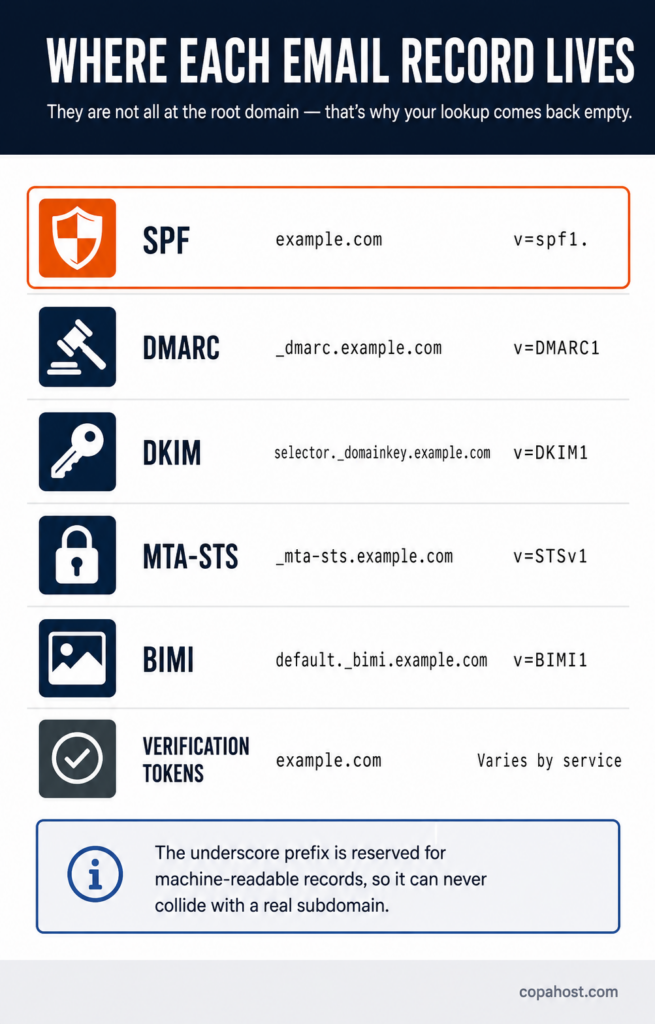
The underscore prefix isn’t decoration. Names beginning with _ are reserved for machine-readable records by convention, precisely so they can’t collide with a real subdomain someone might want to create.
So when a TXT lookup on your domain returns only the SPF record and a couple of verification strings, nothing is missing — you’re simply looking at one of several locations.
How to run a TXT lookup
On Linux or macOS, with dig:
# SPF and verification tokens

dig example.com TXT +short


# DMARC

dig _dmarc.example.com TXT +short


# DKIM (replace "selector" with your actual selector)

dig selector._domainkey.example.com TXT +short
The +short flag strips everything but the answer. Without it you get the full response, which is useful when you want to see the TTL or which server replied.
On Windows, from the Command Prompt:
nslookup -type=TXT example.com

nslookup -type=TXT _dmarc.example.com

nslookup -type=TXT selector._domainkey.example.com
In PowerShell:
Resolve-DnsName example.com -Type TXT
Querying a specific resolver. After changing a record, it helps to ask a public resolver directly rather than your cached local one:
dig @1.1.1.1 example.com TXT +short

dig @8.8.8.8 example.com TXT +short
Online tools — MXToolbox, whatsmydns, DNSChecker — run the same queries from a browser and often check propagation across regions at the same time.
Reading what comes back
The output looks cluttered the first time. A typical root-domain response:
"v=spf1 include:_spf.google.com ~all"

"google-site-verification=rXbT9k2mQpL4vN8..."

"MS=ms12345678"

"atlassian-domain-verification=8Kj2..."
Four separate TXT records at the same name, and that’s normal. A domain can have many TXT records — what matters is which prefix each one starts with.
The quotation marks are part of the DNS format, not part of the value. And if you see a long record broken into multiple quoted chunks, that’s the 255-byte limit at work — more on that below.
Checking your SPF record
Look for the string starting with v=spf1. Two things to verify:
There must be exactly one. RFC 7208 forbids more than one SPF record on the same name — and this is the single most common SPF failure. Two records can each be perfectly valid on their own and still break SPF entirely, because receivers see the duplication and return a permanent error. It usually happens when a second service is added and someone publishes a new record instead of merging into the existing one.
It must stay within 10 DNS lookups. Every include:, a, mx, ptr and redirect in your SPF record triggers a DNS query. The limit is ten, and exceeding it produces PermError — the record is treated as invalid, as if it weren’t there. Adding services one at a time is how domains cross it without noticing.
Checking DKIM: first you need the selector
DKIM is where TXT lookups most often stall, and the reason is structural: you cannot query a DKIM record without knowing its selector.
Unlike SPF and DMARC, which live at predictable hostnames, DKIM records sit at selector._domainkey.yourdomain.com — and the selector is chosen by whoever set up the signing. There’s no way to list them, and no way to guess reliably.
The definitive way to find yours: open an email you sent from that domain, view the original message, and look in the headers for the DKIM-Signature line. Inside it, the s= tag is the selector.
DKIM-Signature: v=1; a=rsa-sha256; c=relaxed/relaxed;

    d=example.com; s=default; t=1699...


# The selector is "default", so:

dig default._domainkey.example.com TXT +short
Common defaults, if you can’t check the headers: Google Workspace uses google, Microsoft 365 uses selector1 and selector2, cPanel servers typically use default, and sending platforms use their own — k1 for Mailchimp, s1/s2 for SendGrid, mandrill for Mandrill.
A domain can have several DKIM records at once, one per sending service. That’s expected, not a conflict — each selector points to a different key.
Checking DMARC
Query _dmarc.yourdomain.com and look for the record starting with v=DMARC1. What to check:
Only one record. Same rule as SPF — two DMARC records at _dmarc invalidate the policy.
The policy tag. p=none monitors without acting; p=quarantine sends failing mail to spam; p=reject refuses it.
A reporting address. Without rua=, you get enforcement without visibility, which makes problems very hard to diagnose.
Our guide on DMARC failures covers what each error message means and what changed in the 2026 specification.
Other TXT records you’ll find
Verification tokens. Services prove you own a domain by asking you to publish a string they generate. Google Search Console, Microsoft 365, Zoom, Atlassian, Facebook Business and hundreds of others use this. They accumulate over the years, and old ones from services you no longer use can safely be removed — though there’s no harm in leaving them.
MTA-STS at _mta-sts.yourdomain.com declares that your domain requires TLS for incoming mail, protecting against downgrade attacks.
BIMI at default._bimi.yourdomain.com points to your brand logo, which supporting mailbox providers display next to your messages. It requires DMARC at enforcement to work.
Common problems and what causes them
| Symptom | Cause |
|---|---|
| Lookup returns nothing for DKIM or DMARC | You queried the root domain. They live at _domainkey and _dmarc |
SPF PermError or “too many DNS lookups” | The record exceeds the 10-lookup limit. Consolidate includes |
| SPF fails despite looking correct | Two SPF records on the same name. Merge them into one |
| DKIM validates in the panel but fails in transit | Split-string corruption — see below |
| Record added, lookup still shows the old value | DNS caching. Wait out the TTL, or query @1.1.1.1 directly |
| Works from one network, not another | Propagation still in progress across resolvers |
A single TXT string can’t exceed 255 bytes. Longer values — most notably 2048-bit DKIM public keys — must be split into multiple strings, which DNS then concatenates back together when reading.
This is where a subtle failure lives: if the split happens at the wrong byte, or if a space is introduced between the chunks, the reassembled key is corrupt. It often looks perfectly fine in the DNS provider’s interface. If DKIM validates locally but fails at the receiving end, run a TXT lookup and inspect how the value is actually being returned — the raw output shows the split that the panel hides.
After changing a record
TXT changes are subject to the same caching as any DNS record. Two things help:
Lower the TTL before making the change, if you know it’s coming. A TTL of 300 seconds means resolvers re-check every five minutes instead of every hour.
Query an authoritative resolver directly to confirm the change landed, rather than trusting your local cache:
dig @1.1.1.1 _dmarc.example.com TXT +short
Our guide on DNS propagation covers the timing in detail.
Getting the email authentication stack right is fiddly, and the failures are quiet. Copahost hosting sets up SPF and DKIM automatically when you create an account, with full DNS management in the panel for adding DMARC and verification records yourself. Free migration from your current host included.
See hosting plansFrequently asked questions
What is a DNS TXT record?
A TXT record stores text attached to a domain name. Defined in RFC 1035, it was originally meant for human-readable notes, but today it carries machine-readable configuration — the entire email authentication stack (SPF, DKIM, DMARC), newer standards like MTA-STS and BIMI, and ownership verification tokens for services like Google and Microsoft.
How do I look up a TXT record?
On Linux or macOS, run dig example.com TXT +short. On Windows, use nslookup -type=TXT example.com. In PowerShell, Resolve-DnsName example.com -Type TXT. Online tools like MXToolbox and whatsmydns do the same from a browser and can also check propagation across regions.
Why doesn’t my TXT lookup show DKIM or DMARC?
Because they aren’t at the root domain. DMARC lives at _dmarc.yourdomain.com and DKIM at selector._domainkey.yourdomain.com. A lookup on the domain alone returns only SPF and verification tokens — the others need their own query at the correct hostname.
How do I find my DKIM selector?
Open an email sent from your domain, view the original message, and look for the DKIM-Signature header. The s= tag inside it is your selector. There’s no way to list selectors from DNS, so this is the reliable method. Common defaults are google for Google Workspace, selector1 and selector2 for Microsoft 365, and default on cPanel servers.
Can a domain have more than one TXT record?
Yes, and most do. A typical business domain has an SPF record, a DMARC record, several DKIM records (one per sending service) and multiple verification tokens. The exception is SPF: RFC 7208 allows only one SPF record per name, and having two breaks SPF entirely even if each looks valid.
What is the 255-character limit on TXT records?
A single TXT string can’t exceed 255 bytes. Longer values are split into multiple strings that DNS concatenates when reading. This affects 2048-bit DKIM keys in particular — and if the split is done incorrectly, the reassembled key is corrupt, which often isn’t visible in the DNS provider’s interface.
Why does my SPF record fail with “too many DNS lookups”?
Because SPF allows a maximum of ten DNS lookups when evaluating a record, and each include:, a, mx and redirect counts toward it. Exceeding the limit returns PermError, and the record is treated as invalid. The fix is consolidating includes or removing services no longer in use.
How long does a TXT record take to propagate?
It depends on the TTL of the record and on resolver caching — typically minutes to a few hours, occasionally up to 48. To confirm a change without waiting for your local cache, query a public resolver directly with dig @1.1.1.1.
See also
For the wider picture, see what DNS stands for and DNS propagation. On the email side, see DMARC failures, what an email domain is and reverse DNS lookup, which covers the PTR record that receivers check before authentication. And if you’re publishing these records for a server you run yourself, see self-hosted email server.
Conclusion
Most TXT lookups that “come back empty” aren’t empty at all — the query went to the wrong hostname. SPF sits at the root, DMARC at _dmarc, DKIM at selector._domainkey, and knowing those three locations resolves the majority of confusion around checking email authentication. Beyond that, two rules prevent the quietest failures: never publish a second SPF record on the same name, and check the raw output when a DKIM key looks fine in the panel but fails in transit — the 255-byte split is visible in the lookup and invisible in the interface.
