
You can have a working mail server this afternoon. A VPS, a Mailcow deployment, a few DNS records — the setup is genuinely straightforward now, and the tooling is better than it has ever been.
The hard part starts the day after. Deliverability is where self-hosted email fails, and it fails slowly: mail works for a week, then a client says they never got your quote, and you discover half your messages have been landing in spam since Tuesday.
This guide covers what self-hosting email actually requires, what it costs once you count your own time, where the failures happen, and the hybrid arrangement most experienced self-hosters end up with.
| Setup time | An afternoon with an all-in-one suite |
| Real cost | $5–20/month for the VPS, plus 1–2 hours/month of your time |
| The hard part | Deliverability — IP reputation, and Gmail and Microsoft’s rules |
| Worth it if | Privacy requirement, learning, or high sending volume |
| Not worth it if | Business email that must arrive, and you’re the only technical person |
| What most end up doing | Self-host receiving, relay sending through a service |
Table of Contents
Why people want to self-host email
The motivations are legitimate, and worth naming clearly rather than dismissing.
Privacy. No third party scanning your mail, no terms of service that change, no provider deciding your account looks suspicious and suspending it with no appeal. For anyone who has already moved files to Nextcloud and photos to Immich, email is the obvious next step.
Data residency. Some organisations have a legal or contractual requirement that data stay in a specific jurisdiction. Running the server yourself is the most direct way to satisfy it.
Cost at volume. Per-mailbox pricing is fine at five users and expensive at fifty. Per-email pricing on transactional services is fine at a thousand messages and expensive at half a million.
Learning. SMTP, DNS, TLS, spam filtering — running a mail server teaches more about how the internet actually works than almost any other project. That’s a real reason.
Ownership. No provider can sunset the product, raise the price, or lock you out of your own archive.
None of these are wrong. The question isn’t whether the motivations are valid — it’s whether the ongoing cost is one you want to pay.
What you need before you start
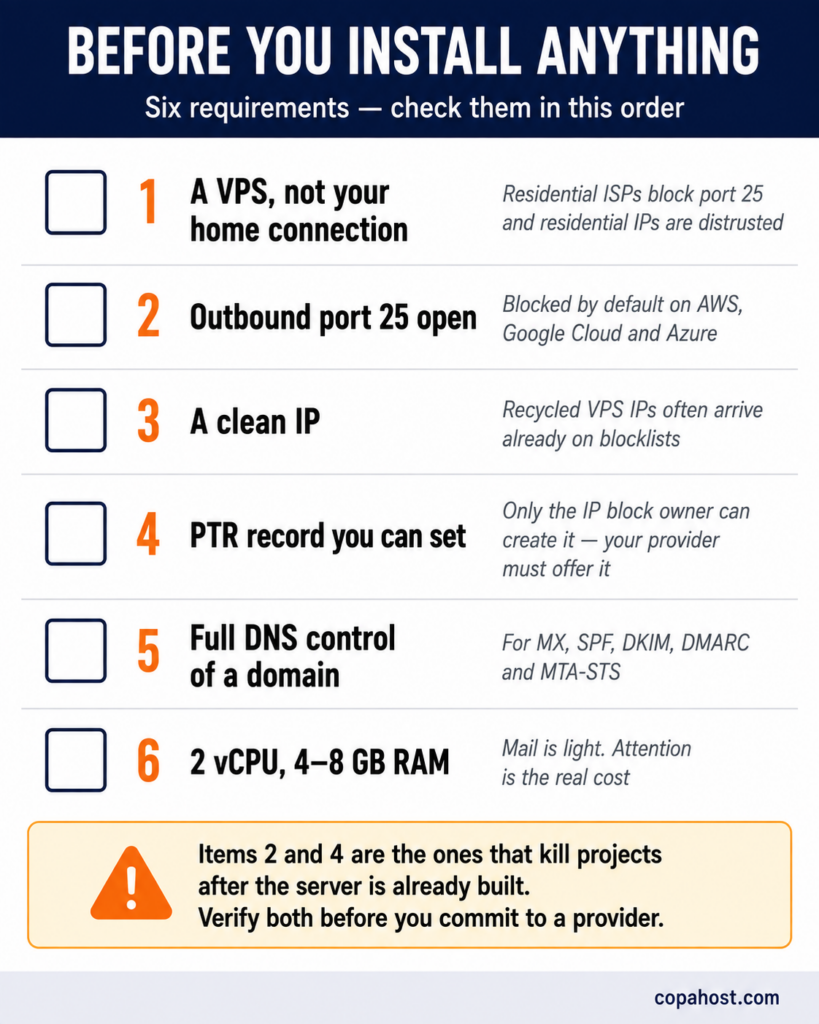
The requirements list eliminates a lot of candidates before any software is installed.
A VPS or dedicated server — not your home connection. Practically every residential ISP blocks outbound port 25, and residential IP ranges are distrusted by every major mailbox provider. This isn’t a policy you can appeal. That doesn’t rule out a machine at home for everything else — receiving mail, files, media and backups all work fine there. Our guide on home servers covers what does belong in the house.
Outbound port 25 open. Several major clouds block it by default on new accounts, including AWS, Google Cloud and Azure, and unblocking requires a support request that is sometimes refused. Check this before you commit to a provider — it’s the single most common way people discover their plan won’t work.
A static IP with clean reputation. New VPS IPs are often recycled, and a recycled IP can arrive already on blocklists because of what the previous tenant did. Check it against the major lists before you build anything on it.
Control of the PTR record. Reverse DNS must resolve your IP back to your mail server’s hostname, and only the owner of the IP block can set it — meaning your provider has to offer it. Without a matching PTR, a significant share of your mail is rejected at connection, before content is even examined. Our guide on reverse DNS lookup explains how those records work and why they’re not yours to create.
A domain with full DNS control, for the MX, SPF, DKIM, DMARC and optionally MTA-STS records.
Modest hardware. Two vCPUs and 4 to 8GB of RAM handle a light setup comfortably. Mail is not resource-hungry; the constraint is attention, not CPU.
The software: all-in-one or build it yourself
| Option | Difficulty | Notes |
|---|---|---|
| Mailcow | Low | Docker-based, actively maintained, good admin UI. The most common recommendation |
| Mail-in-a-Box | Lowest | Opinionated and nearly automatic. Least flexible, which is the point |
| iRedMail | Low–medium | Long-established, installs on bare metal rather than Docker |
| Stalwart | Medium | Newer, written in Rust, single binary. Gaining attention quickly |
| Postfix + Dovecot + Rspamd | High | Full control, full responsibility. What the suites above run underneath |
The honest recommendation: use an all-in-one suite unless you have a specific reason not to. Assembling Postfix, Dovecot, OpenDKIM and Rspamd yourself teaches you more, and it also gives you more surfaces to misconfigure — and a misconfigured mail server is either an open relay or an unreachable one.
The deliverability problem
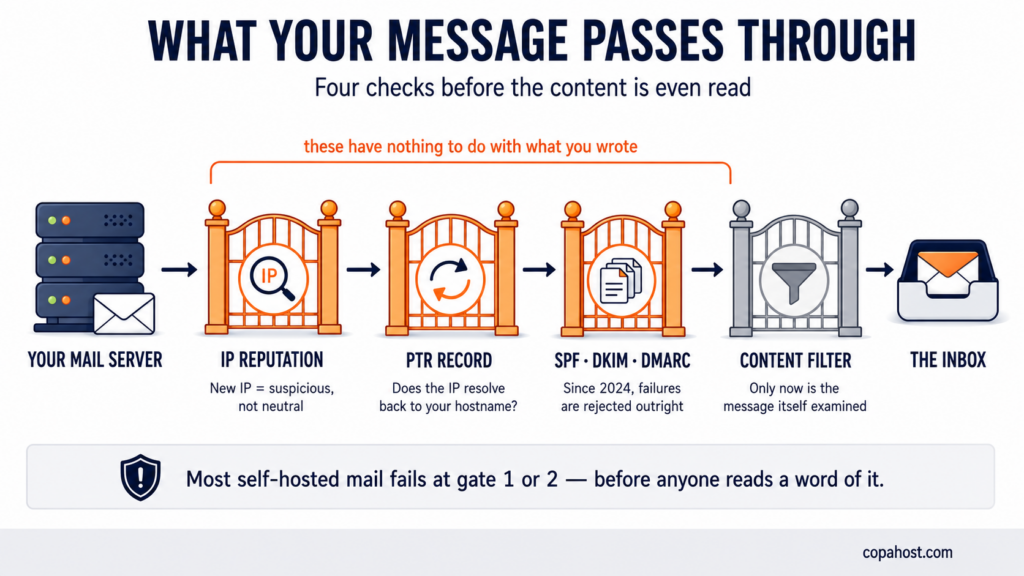
This is the section that decides whether self-hosting works for you. Everything above is a weekend project; this is the ongoing part.
Your IP starts with no reputation
Mailbox providers score senders on history. A brand-new IP has none — which is treated as suspicious, not neutral, because spammers churn through fresh IPs constantly.
Building reputation takes weeks of consistent, low-volume, well-received sending. You can’t shortcut it. Sending a few hundred messages on day one is the fastest route to a blocklist.
The 2026 authentication rules are non-negotiable
Since 2024, Gmail, Yahoo and Microsoft have enforced authentication requirements that were previously advisory. Non-compliant mail is now rejected at SMTP level, permanently — not filtered to spam, refused outright.
What you need, correctly configured:
SPF — declares which servers may send for your domain. One record, no more, and within the 10-lookup limit.
DKIM — cryptographically signs your outgoing mail. The public key goes in DNS at a selector you choose.
DMARC — tells receivers what to do when SPF and DKIM fail, and where to send reports. Start at p=none and tighten once the reports look clean.
A matching PTR record, which is checked before any of the above.
Our guide on DNS TXT lookups covers how to check that all three are published correctly — a step worth doing before you send anything, since each lives at a different hostname.
Microsoft and Google are the hard ones
Microsoft — Outlook.com and Hotmail are the most frequently reported difficulty. They operate their own sender support process, and new senders often need to go through it before mail reaches inboxes reliably.
Google — generally more forgiving than Microsoft for small senders, but strict about volume spikes and about DMARC alignment.
Everyone else — usually fine once SPF, DKIM, DMARC and PTR are in place.
And you’ll be monitoring this indefinitely
Reputation isn’t a state you achieve. A compromised account sending spam, a mailing list complaint, a spike in bounces — any of these can put you back on a blocklist, and you’ll only know if you’re watching.
What that means practically: DMARC reports reviewed, blocklists checked periodically, and postmaster tools set up with the major providers.
What it actually costs
The VPS price is the smallest part.
| Cost | Self-hosted | Managed (5 users) |
|---|---|---|
| Infrastructure | $5–20/month VPS | $0 — included |
| Per-user fees | $0 | ~$6/user = $30/month |
| Setup | 4–8 hours, once | 1 hour |
| Ongoing maintenance | 1–2 hours/month | Effectively none |
| When it breaks | You fix it, at whatever hour | Support ticket |
The maintenance line is where the comparison actually happens. At one to two hours a month, valuing your time at even $30 an hour puts the labour cost above the managed alternative for a small team.
The maths inverts at scale. Fifty mailboxes at $6 each is $300 a month against a $20 VPS. An agency running one instance for twenty client domains saves thousands a year. Above roughly 50,000 outbound messages a month, self-hosting starts winning clearly on cost — below about 25,000, it rarely does.
When it makes sense, and when it doesn’t
| Self-host | Don’t |
|---|---|
| You have a privacy or data-residency requirement you can name | It’s business email and a missed message costs you a client |
| You’re doing it to learn, and mail failing is acceptable | You’re the only technical person, with no backup |
| You have many mailboxes and the per-user maths favours it | You send marketing or transactional mail in volume from day one |
| You already run infrastructure and this is one more service | You can’t commit an hour or two a month, indefinitely |
The hybrid most people end up with
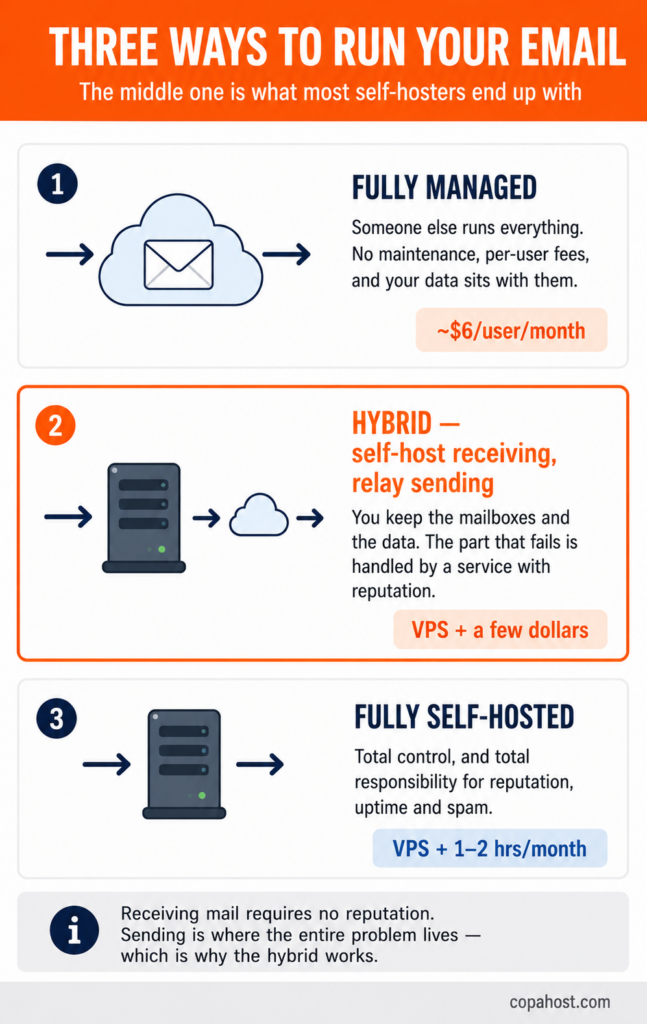
This is the arrangement experienced self-hosters converge on, and it’s rarely presented as an option in beginner guides.
Self-host receiving. Relay sending.
Receiving mail is the easy half — your MX record points at your server, messages arrive, and no reputation is required to accept them. It’s outbound where the whole deliverability problem lives.
So: run your own server for mailboxes, storage and receiving, and configure it to send through a transactional service — Amazon SES, Postmark, Mailgun, Resend or similar. They cost from a few dollars a month at low volume, and they arrive with the IP reputation you’d otherwise spend months building.
What you keep: control of your data at rest, your own mailboxes, no per-user fees, and the ability to move.
What you hand off: the part that fails, and the part that requires ongoing attention.
A common split for teams that send in volume: transactional mail — receipts, password resets, anything that must arrive — through a paid service with strong deliverability; bulk or marketing mail through the self-hosted server, where a small failure rate is tolerable.
If you’re going ahead: the first-day checklist
1. Verify port 25 is open outbound, before anything else. Test it, don’t assume.
2. Check the IP against blocklists. If it’s already listed, request a different one now rather than after you’ve configured everything.
3. Set the PTR record to match your mail server’s hostname, and verify the forward record resolves back to the same IP.
4. Publish SPF, DKIM and DMARC before sending a single message. Start DMARC at p=none with a reporting address.
5. Install your suite of choice and get TLS certificates issued.
6. Send test messages to a deliverability checker — several free ones score your setup and tell you exactly what’s missing.
7. Warm up slowly. A handful of messages a day for the first week, growing gradually. This is the step people skip and regret.
8. Set up monitoring for the service itself, for disk space, and for your DMARC reports.
9. Register with postmaster tools at Google and Microsoft.
10. Arrange backups, and test restoring one. Your mail archive now has exactly one copy unless you make another.
The two requirements most providers won’t give you. Copahost VPS plans start at €3.99/month with full root access, a dedicated IP and reverse DNS you set yourself — the prerequisites for a mail server that actually delivers. And if you decide self-hosting isn’t the right trade, our shared plans include mailboxes at your own domain with SPF and DKIM already configured.
See VPS plansFrequently asked questions
Is self-hosting email worth it?
It depends on why you’re doing it. For a privacy or data-residency requirement, for learning, or for a large number of mailboxes, yes. For business email that has to arrive reliably, usually not — the deliverability battle costs more time than the licence fees it saves. Most people who try it end up with a hybrid: self-hosted receiving, relayed sending.
How hard is it to set up a self-hosted email server?
The setup itself is an afternoon with a suite like Mailcow or Mail-in-a-Box. The difficulty isn’t installation — it’s everything after: IP reputation, authentication records, spam filtering, security patches, and monitoring. Guides that describe it as easy are describing day one.
Why does my self-hosted email go to spam?
Usually one of four things. Your IP has no sending reputation yet, and new IPs are distrusted by default. Your PTR record doesn’t match your mail hostname. SPF, DKIM or DMARC is missing or misconfigured. Or the IP was already on a blocklist when you got it. Check all four before assuming it’s the content.
Can I run a mail server at home?
Practically, no. Almost every residential ISP blocks outbound port 25, and residential IP ranges are distrusted by every major mailbox provider regardless. You can run one for receiving on a home connection, but sending will fail. A VPS is the realistic minimum.
What’s the best self-hosted email software?
Mailcow is the most common recommendation — Docker-based, actively maintained, with a usable admin interface. Mail-in-a-Box is simpler and more opinionated, iRedMail is long-established, and Stalwart is a newer single-binary option written in Rust. Assembling Postfix, Dovecot and Rspamd yourself gives full control and considerably more ways to get it wrong.
Do I need a static IP for a mail server?
Yes. Mail servers are identified by IP, and the PTR record that receivers check has to point at a fixed address. Dynamic IPs also tend to sit in ranges that mailbox providers block wholesale.
What is a PTR record and why does it matter for email?
It maps your server’s IP back to its hostname — the reverse of a normal DNS lookup. Receiving mail servers check it as a first, cheap sanity test: if the IP claiming to be mail.yourdomain.com doesn’t resolve back to that name, a significant share of receivers reject the connection outright. Only the owner of the IP block can set it, which means your provider must offer the option.
How much does it cost to self-host email?
The VPS runs $5 to $20 a month, and there are no per-user fees. The real cost is one to two hours a month of maintenance, indefinitely. For a small team, that labour usually exceeds what a managed provider would charge. Above roughly fifty mailboxes, or 50,000 outbound messages a month, the maths inverts.
Can I self-host email and still use a service for sending?
Yes, and it’s what most experienced self-hosters do. You run the server for mailboxes and receiving, then configure it to relay outbound mail through Amazon SES, Postmark, Mailgun or similar. You keep control of your data and avoid per-user fees, while handing off the part that requires constant reputation management.
What happens if my self-hosted server goes down?
Incoming mail is usually queued by the sending server and retried for a day or more, so a short outage doesn’t lose messages. A longer one does, once senders give up. Outbound mail simply stops. There’s no support line — you’re the one who fixes it, at whatever hour it happens.
See also
On the records that decide deliverability, see reverse DNS lookup and DNS TXT lookups. On the ports involved, see common TCP and UDP ports and port 22 for the SSH access you’ll need. And for the alternative, see what an email domain is.
Conclusion
Self-hosting email is more achievable than its reputation suggests and harder than the tutorials imply — which is a confusing combination, and the reason so many people start and then quietly stop.
The setup is a weekend. The deliverability is a subscription — paid in attention rather than money, every month, indefinitely. If that trade appeals, the requirements are clear: a VPS with port 25 open, a clean IP, a PTR record you control, and the three authentication records published correctly before you send anything.
And if it doesn’t appeal, the hybrid is not a failure. Self-hosting the mailboxes and relaying the sending gives you the data ownership that motivated the project in the first place, without the part that fails. Most people who have run their own mail server for years arrived at exactly that arrangement — usually after trying the pure version first.
