
cPanel and DirectAdmin are the two most popular web hosting control panels — both let you manage domains, email, databases, files, and SSL from a browser, with no command line needed. The core difference is that cPanel is the feature-rich market leader with a polished interface and a bigger ecosystem, while DirectAdmin is lighter, faster, and more affordable. Neither is universally “better”; the right one depends on what you need.
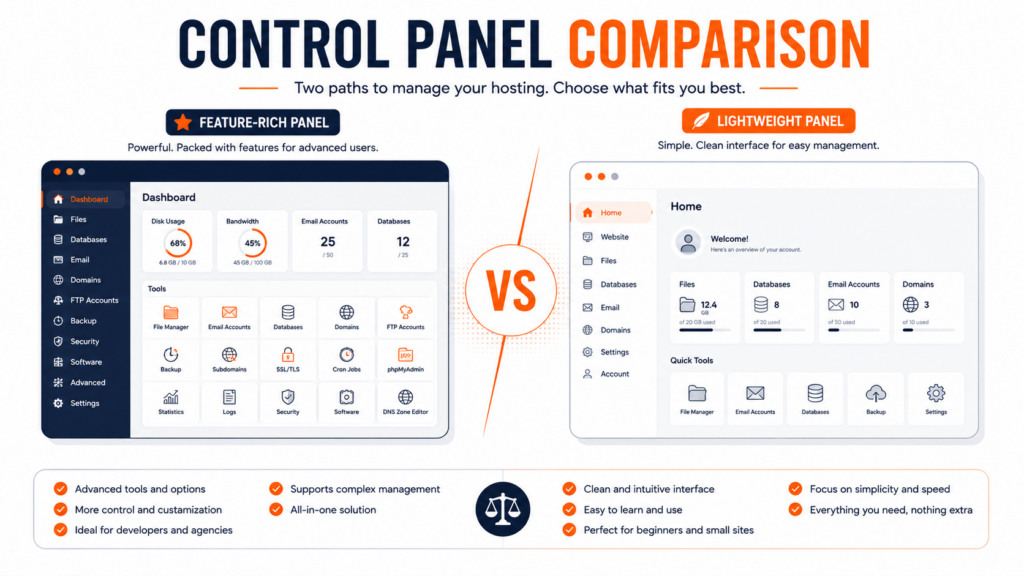
If you’re choosing a hosting plan, the control panel is the interface you’ll actually use every day — to create email accounts, install WordPress, manage files, and more. So the cPanel vs DirectAdmin question is worth understanding. This guide compares them across the things that matter — interface, performance, price, features, and security — and helps you decide. For the bigger picture of how hosting works, see our guide on what web hosting is.
What is a hosting control panel?
A control panel is the visual dashboard that lets you manage your hosting account without technical knowledge. Instead of typing server commands, you click through a browser interface to handle everyday tasks: creating email accounts at your domain, uploading and editing files, setting up databases, installing applications like WordPress, managing SSL certificates, and configuring DNS. It’s what turns “administering a server” into a few clicks — and it’s a central part of any shared hosting experience.
Both cPanel and DirectAdmin do this job, and both cover the same core tasks. The difference is in how they look, how much they cost, how many resources they use, and how deep their feature sets go.
cPanel vs DirectAdmin: quick comparison
Here’s the side-by-side at a glance, before we dig into each point:
The two panels in brief
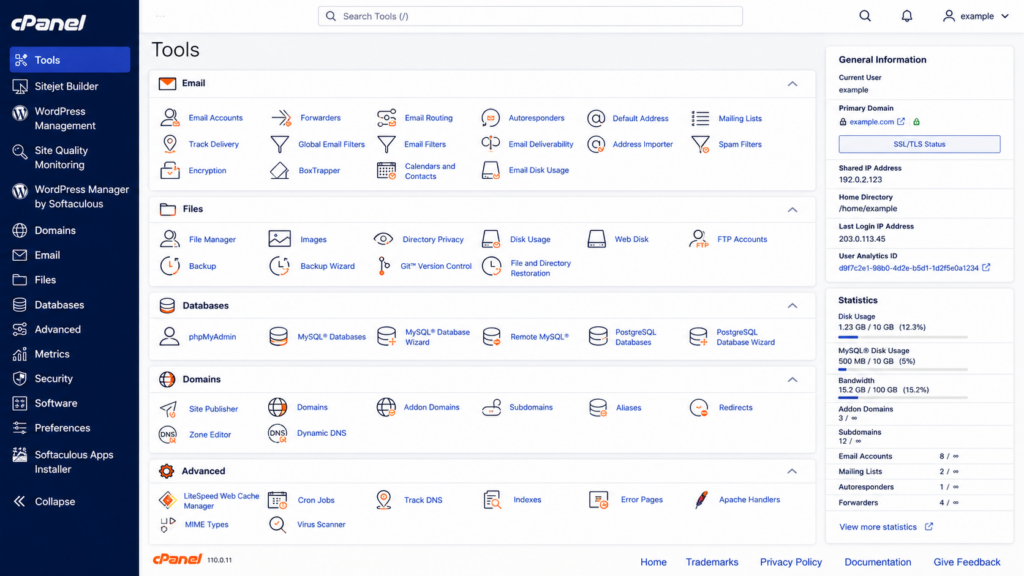
cPanel launched in 1996 and is the long-standing market leader — it powers a large majority of Linux hosting worldwide. It’s known for a polished, feature-rich interface and the largest ecosystem of integrations, tutorials, and support resources. It pairs with WHM (Web Host Manager) for server-level administration, a split that’s convenient in daily work. Its main drawbacks are a higher price and heavier resource use. You can read more about its file tools in our guide on the cPanel file manager.
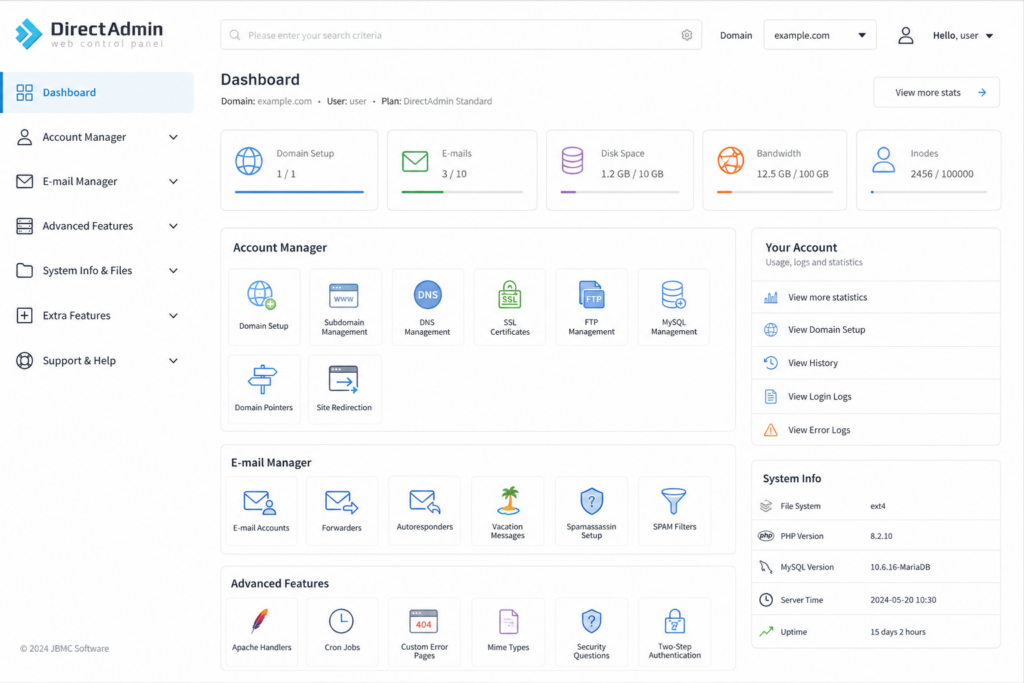
DirectAdmin has been around since 2003 and is known for being lightweight, fast, and affordable. It covers all the essential hosting tasks with a cleaner, distraction-free interface and uses fewer server resources, which can mean better performance on smaller servers. It grew significantly after cPanel’s 2019 licensing change pushed many providers to look for a leaner alternative. We cover it in depth in our guide on what DirectAdmin is.
To put the market in perspective: cPanel remains the dominant control panel, powering the large majority of Linux hosting worldwide — by most estimates well over 90% of the cPanel/DirectAdmin segment. DirectAdmin holds a smaller share, but it has been the fastest-growing of the two, expanding significantly since cPanel’s 2019 pricing change. In other words, cPanel leads on installed base, while DirectAdmin leads on momentum.
Interface and ease of use
Both panels let you do the same things; they just present them differently. cPanel offers a more polished, organized interface, and the clear separation between cPanel (for end users) and WHM (for server administration) is genuinely convenient. Its popularity also means nearly every hosting tutorial and YouTube walkthrough uses cPanel screenshots, which helps when you’re looking for help.
DirectAdmin has a simpler, lighter interface that’s efficient once you know it — features are thoughtfully placed to minimize clicks, and there’s no aggressive upselling cluttering the screen. It offers customizable layouts, including a simplified view for newcomers and an advanced view for professionals. Some users find cPanel friendlier at first glance; others prefer DirectAdmin’s clean, no-distraction approach. For everyday tasks — creating an email account, installing WordPress — both are perfectly manageable.
What the two panels look like
Performance and resource usage
This is where DirectAdmin has a clear edge. Its lightweight architecture uses fewer server resources (CPU and RAM), which can translate into smoother performance, especially on smaller servers or busy shared environments. cPanel is more feature-rich, but that comes with a heavier footprint that can feel bloated by comparison. If raw efficiency and getting the most out of server resources matter to you, DirectAdmin is the leaner option — one reason many performance-focused hosts adopt it.
Price
Price is one of the biggest practical differences. cPanel costs significantly more — generally two to three times as much — and uses a pricing model based on a tier fee plus a per-account charge, so costs climb as you host more accounts. DirectAdmin is markedly cheaper and uses a flat per-server fee in its standard licensing, regardless of account count, which makes it very cost-effective at scale.
For you as a customer, this difference often shows up indirectly: hosts that use DirectAdmin can frequently offer lower prices because their own licensing costs are lower. It’s part of why DirectAdmin became so popular with cost-conscious providers after cPanel’s 2019 pricing change.
Features and ecosystem
Both panels handle the essentials — domains, email, databases, file management, SSL, and one-click app installers (both support Softaculous for installing WordPress and other software). The difference is depth. cPanel has the larger ecosystem: more third-party integrations, tighter WHMCS integration for billing, and tools like the WordPress Toolkit with staging and cloning features that agencies managing many WordPress sites may value. DirectAdmin covers everything most users need and includes a WordPress Manager, but some of its advanced tooling is less extensive than cPanel’s. For the majority of websites, both offer all the features you’ll actually use; the gap only really matters for power users and large operations.
Security
Both panels are secure and actively maintained, offering the standard protections: SSL management (including free Let’s Encrypt certificates), firewall compatibility, account isolation, and regular updates. Neither is inherently “more secure” than the other — security depends far more on how the host configures and maintains the server than on the panel itself. A well-managed DirectAdmin server is just as secure as a well-managed cPanel one. What matters is choosing a provider that takes security seriously, regardless of the panel.
Migrating between cPanel and DirectAdmin
A common question: can you move from one to the other? Yes — DirectAdmin can import cPanel backups, and automated migration tools exist. The process usually requires a short maintenance window (some downtime), and it’s worth verifying details afterward, like email forwarding rules and custom DNS records, to make sure everything transferred correctly. In practice, most people don’t choose a panel and then migrate; they pick a host, and the host’s panel comes with it. So the panel is really one factor in choosing a provider, not a separate decision you make later.
What about other control panels?
cPanel and DirectAdmin are the two most common panels in Linux shared hosting, but they aren’t the only options. Plesk is another major panel, often the go-to choice for Windows hosting (and it supports Linux too). ispmanager is a lighter alternative known for a clean, modern interface.
There are also custom panels that some hosts build in-house. For most users comparing shared hosting plans, though, the realistic choice comes down to cPanel or DirectAdmin — they’re what the vast majority of providers offer, which is why they’re the focus here.
So, which should you choose?
There’s no universal winner — it comes down to your priorities:
Choose cPanel if you want the most mature ecosystem, the widest availability of tutorials and integrations, advanced WordPress tooling (staging/cloning), or you’re running a large operation that benefits from its ecosystem. Choose DirectAdmin if you want speed, efficiency, and lower cost without sacrificing the core features — which describes the vast majority of websites. For most people launching a blog, business site, or small store, DirectAdmin delivers everything they need with better performance per dollar, which is exactly why many quality hosts (Copahost included) use it as their default panel.

The honest takeaway: don’t over-optimize this decision. Both panels do the everyday job well. It’s more important to choose a reliable host than to fixate on the panel — and a good host will have picked a panel that serves its customers well.
Frequently asked questions about cPanel vs DirectAdmin
What’s the difference between cPanel and DirectAdmin?
Both are web hosting control panels that let you manage domains, email, databases, files, and SSL from a browser. cPanel is the feature-rich market leader with a polished interface, a bigger ecosystem, and a higher price. DirectAdmin is lighter, faster, and more affordable, covering all the essential tasks with a cleaner interface and lower resource usage.
Is DirectAdmin as good as cPanel?
For most websites, yes. DirectAdmin handles all the core hosting tasks — email, databases, files, SSL, one-click WordPress installs — with better performance per server resource and a lower cost. cPanel has a larger ecosystem and more advanced tooling (like WordPress staging), which mainly benefits power users and large operations. For typical sites, DirectAdmin is more than enough.
Is DirectAdmin cheaper than cPanel?
Yes, significantly. cPanel generally costs two to three times more and charges per account, while DirectAdmin uses a flat per-server fee in its standard licensing. That’s why hosts using DirectAdmin can often offer lower prices, and why DirectAdmin grew rapidly after cPanel’s 2019 licensing change.
Which is better for beginners, cPanel or DirectAdmin?
Both are manageable for beginners, since neither requires the command line. cPanel benefits from more online tutorials using its interface, which can help when you search for guidance. DirectAdmin offers a simplified view for newcomers and a cleaner, less cluttered screen. For everyday tasks like creating email or installing WordPress, you’ll be fine with either.
Can I migrate from cPanel to DirectAdmin?
Yes. DirectAdmin can import cPanel backups, and migration tools exist to move accounts between them. The process usually needs a short maintenance window, and you should verify details afterward like email forwarding rules and custom DNS records. In practice, most users get whichever panel their host provides rather than migrating themselves.
Does DirectAdmin support WordPress?
Yes. DirectAdmin supports one-click WordPress installation through Softaculous and includes a WordPress Manager. cPanel offers a more advanced WordPress Toolkit with extra features like staging and cloning, which agencies managing many sites may prefer, but DirectAdmin covers what most WordPress users need.
Which control panel does Copahost use?
Copahost uses DirectAdmin as the default control panel on its shared hosting, chosen for its speed, efficiency, and the lower cost it lets us pass on to customers. It delivers all the essential tools — email, databases, file management, one-click installs, and SSL — in a clean, fast interface.
Copahost uses DirectAdmin as its default panel — fast, intuitive, and resource-efficient — so you manage email, files, databases, and one-click WordPress installs with ease. Free SSL and real support included.
Explore hosting plansConclusion
cPanel and DirectAdmin are both excellent control panels that handle the same everyday hosting tasks; the real differences are price, resource usage, and ecosystem depth. cPanel leads on features and maturity but costs more and runs heavier; DirectAdmin is lean, fast, and affordable while covering everything most websites need. For the majority of users, DirectAdmin offers the best balance of performance and value — but the more important decision is choosing a reliable host. Whichever panel your provider uses, what matters most is that your site is fast, secure, and well-supported.
