
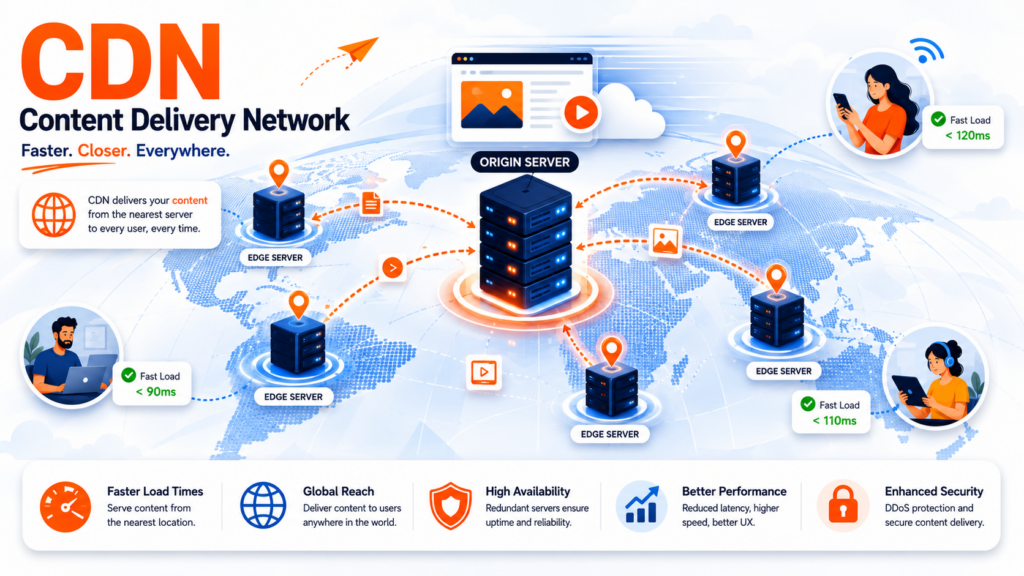
A CDN (Content Delivery Network) is a group of servers spread around the world that store copies of your website’s content close to your visitors. Instead of every visitor loading your site from one distant server, a CDN serves it from the nearest location — making the site load faster, handling more traffic, and reducing the load on your main server. The way it stores those copies is called CDN caching, and it’s the core of how a CDN works.
If your site has visitors from different regions — or you just want it to load faster — a CDN is one of the most effective tools available. This guide explains what a CDN is, how CDN caching actually works (edge servers, cache hits, TTL, and more), the difference between a CDN and plain caching, the benefits, and when you need one. For the bigger picture of how sites are served, see our guide on what web hosting is.
Table of Contents
What is a CDN?
A CDN (Content Delivery Network) is a geographically distributed network of servers that work together to deliver web content quickly. The core idea is distance: the farther a visitor is from your server, the longer your site takes to load. A CDN solves this by keeping cached copies of your content on servers all over the world, so each visitor is served from a location physically near them.
Think of it like this: instead of a single store that everyone in the world has to travel to, a CDN is like having a local branch in every city. When someone wants your content, they get it from the branch around the corner, not from the original store across the globe. That’s why a large portion of all internet traffic — including giants like Netflix and Facebook — is delivered through CDNs.
A CDN stores things like your HTML pages, images, CSS, JavaScript, and videos. It doesn’t replace your web hosting — your main server (the “origin”) still holds the original site. The CDN sits in front of it, serving cached copies and only going back to the origin when it needs to.
How does a CDN work?
A CDN relies on a few key pieces working together:
The origin server is your main server — the source of truth that holds the original version of your site. Edge servers are the CDN’s servers distributed across the world, each storing cached copies of your content. They’re grouped in Points of Presence (PoPs) — the physical locations (cities/regions) where edge servers live. And DNS routing directs each visitor’s request to the nearest edge server rather than all the way to your origin.
Here’s the flow in practice: when a visitor in, say, New York requests your site (hosted in London), the CDN routes the request to a nearby edge server instead of sending it across the Atlantic. If that edge server already has a cached copy, it serves it instantly. If not, it fetches it from the origin once, stores it, and serves every future nearby visitor from the cache. That storing-and-serving process is caching — and it’s worth understanding in detail.
What is a CDN cache?
A CDN cache is the stored copy of your content held on the CDN’s edge servers. CDN caching is the process of saving those copies close to users so requests don’t have to travel back to your origin server every time. Caching is the single most important function of a CDN — it’s what actually makes content delivery fast.
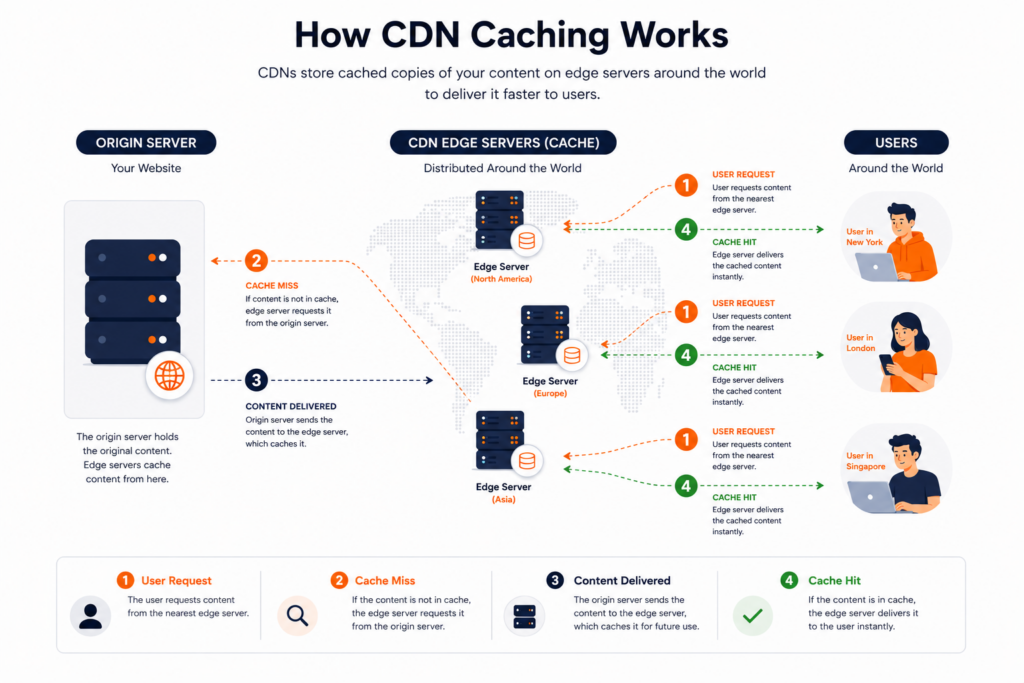
Here’s how CDN caching works step by step:
A few key concepts make caching work:
- Cache hit vs cache miss: a hit means the edge server already has the requested file and serves it immediately. A miss means it doesn’t, so it fetches the file from the origin, stores it, and serves it — the next visitor then gets a hit.
- TTL (Time To Live): how long a cached copy stays “fresh” before the edge server checks the origin for an updated version. It’s usually controlled by HTTP headers like
Cache-Control: max-age. - Fresh vs stale: while within its TTL, content is fresh and served directly. Once the TTL expires, it’s stale and must be re-validated with the origin before being reused.
- Cache purge / invalidation: when you update your site, you can purge the cache to force edge servers to fetch the new version, so visitors don’t keep seeing old content.
This is why CDN caching dramatically improves performance: most requests are served as cache hits, straight from a nearby edge server, without ever touching your origin.
Push vs pull: two ways a CDN gets your content
There are two models for how content ends up on the CDN’s edge servers:
- Pull CDN (the most common): the CDN pulls content from your origin on demand — the first time someone requests a file, the edge server fetches it from the origin, caches it, and serves everyone after that. You don’t upload anything manually; the CDN populates itself as visitors request content. This is what most websites use.
- Push CDN: you proactively push (upload) your content to the CDN ahead of time, so it’s already stored on the edge servers before anyone requests it. This suits large files (software downloads, big videos) or content you know will be heavily requested, giving you more control over what’s stored and when.
For the vast majority of sites — including anything on shared hosting with Cloudflare-style integration — a pull CDN is the default and requires no manual work.
What content does a CDN cache? Static vs dynamic
Not everything on your site can — or should — be cached. The distinction comes down to two types of content:
A CDN caches static content aggressively, because a logo or stylesheet is identical for everyone — so it can be stored at the edge and served instantly. Dynamic content, by contrast, is generated per request and personalized, so caching it could show one user another’s data (imagine seeing someone else’s shopping cart).
Modern CDNs handle this in two ways: they simply don’t cache dynamic content, or they use dynamic acceleration — optimizing the route and connection back to the origin so even non-cached content is delivered faster. The takeaway: a CDN dramatically speeds up the static parts of your site (usually the majority of what loads), while still accelerating the dynamic parts behind the scenes.
Storage speed is another piece of the performance picture — see our guide on SSD vs NVMe.
CDN vs caching: what’s the difference?
These terms are related but not identical, and the distinction matters. Caching is the general technique of storing copies of content for faster reuse — it happens in many places, including your visitor’s own browser cache and on your server. A CDN is a network of distributed servers that uses caching at the edge, close to users, across the globe.
In other words: caching is the what (storing copies), and a CDN is a where and how (doing that caching on a worldwide network of edge servers). A CDN is more than just a cache — it also handles routing, load distribution, and often security — but caching is its engine. The two work together: browser caching reduces repeat requests from a single user, while CDN caching serves all users quickly from the edge.
Benefits of using a CDN
A CDN delivers several concrete advantages:
Faster load times is the headline benefit — content travels a shorter distance, so pages load quicker, especially for distant visitors. Reduced latency follows naturally from serving content from nearby edge servers. There’s less load on your origin server, since the CDN absorbs most requests, which means your hosting handles traffic spikes better.
Beyond DDoS protection, modern CDNs act as a reverse proxy — sitting between visitors and your origin, which hides your server and filters traffic before it ever reaches you. Many include a WAF (Web Application Firewall) that blocks common attacks like SQL injection and cross-site scripting, and they handle TLS/SSL termination, managing the encrypted HTTPS connection at the edge for speed. In other words, a CDN isn’t only a performance tool — it’s also a meaningful security layer. (If you’re setting up HTTPS, see our guide on what an SSL certificate is.)
A CDN also improves scalability and reliability — if one edge server or region has issues, others keep serving. Many CDNs add security, including protection against DDoS attacks, by absorbing and filtering malicious traffic before it reaches your origin. And because faster sites rank better and CDNs support modern protocols, there’s an indirect SEO and performance benefit too.
Does a CDN help with uptime and SEO?
Yes, indirectly, on both counts. By distributing your content across many servers, a CDN means your site doesn’t depend on a single point of failure — if your origin is briefly overloaded, edge servers can keep serving cached content, supporting better uptime. And since site speed is a Google ranking factor (through Core Web Vitals), the faster load times a CDN provides can help your search rankings. A CDN won’t fix a fundamentally slow site on its own, but combined with good hosting it’s a strong performance multiplier.
To be specific about the SEO connection: Google’s Core Web Vitals measure real user experience, and a CDN directly helps two of the factors behind them. It lowers TTFB (Time To First Byte) — how quickly the server starts responding — by serving from a nearby edge instead of a distant origin. And it speeds up LCP (Largest Contentful Paint) — how fast the main content appears — by delivering images and media from the edge. Faster Core Web Vitals mean a better user experience and a stronger ranking signal, which is why performance-focused sites treat a CDN as part of their SEO toolkit.
Do you need a CDN?
A CDN isn’t mandatory for every site, but it’s increasingly worthwhile. You’ll benefit most if:
- Your visitors are spread across different countries or regions — the bigger the distance, the bigger the gain.
- Your site is media-heavy (lots of images or video) — caching those large files at the edge makes a dramatic difference.
- You get traffic spikes or high volume — the CDN absorbs load your origin would struggle with.
- You want extra security against DDoS attacks and malicious traffic.
If your site is small, purely local, and low-traffic, you may not notice a huge difference — but since many CDNs (like Cloudflare) offer free tiers and most quality hosts integrate one, there’s little downside to using it. On a shared hosting plan that includes CDN integration, enabling it is often just a click.
If you’re wondering who provides CDNs: the best-known is Cloudflare (popular for its generous free tier), alongside Akamai, Fastly, Amazon CloudFront, and Bunny, among others. They differ in network size, features, and pricing, but for most websites the CDN that comes integrated with your hosting — or Cloudflare’s free plan — covers the need without choosing a provider separately.
How to set up a CDN
Getting a CDN running is simpler than it sounds. The typical routes:
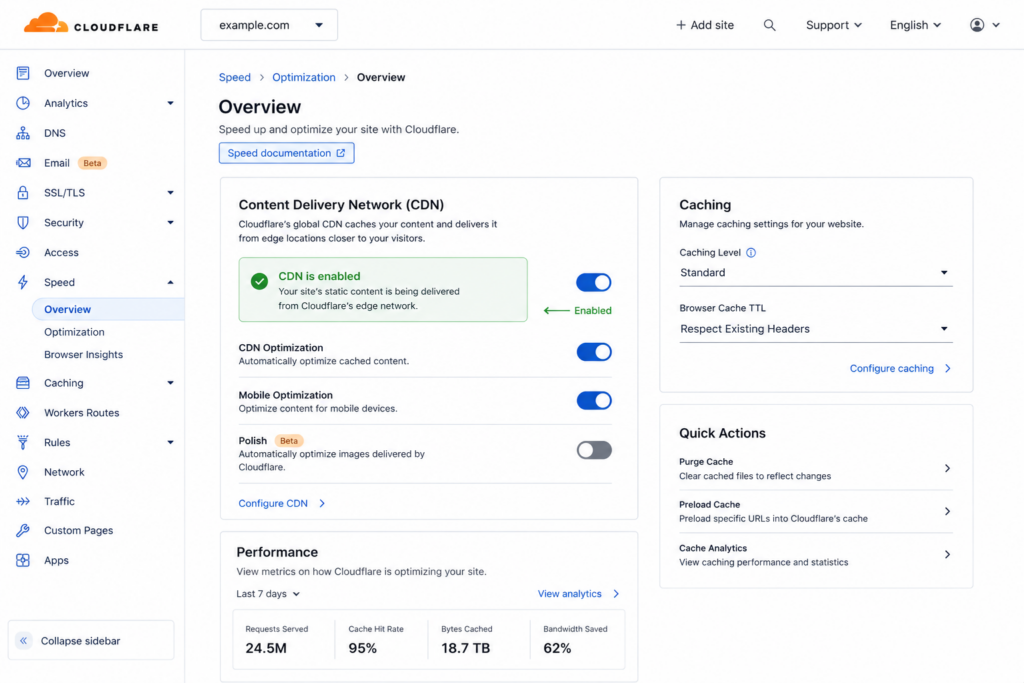
Once active, it’s good practice to set sensible cache rules (what to cache and for how long) and to purge the cache whenever you make major changes, so visitors always see the latest version. With a host that integrates a CDN, most of this is handled for you out of the box.
Frequently asked questions about CDNs
What is a CDN in simple terms?
A CDN (Content Delivery Network) is a network of servers spread around the world that store copies of your website and serve them from the location nearest to each visitor. This makes your site load faster, handle more traffic, and rely less on your single main server. Big sites like Netflix and Facebook deliver their content through CDNs.
What is a CDN cache?
A CDN cache is the stored copy of your content kept on the CDN’s edge servers around the world. CDN caching is the process of saving those copies close to users, so requests are served from a nearby server instead of traveling back to your origin server every time. It’s the core function that makes a CDN fast.
What’s the difference between a CDN and caching?
Caching is the general technique of storing copies of content for faster reuse, and it happens in many places (including your browser). A CDN is a worldwide network of servers that uses caching at the edge, close to users. So caching is the method, and a CDN is the distributed network that applies it globally — a CDN is more than just a cache, but caching is its engine.
How does CDN caching work?
When a visitor requests content, the CDN routes them to the nearest edge server. If that server has a cached copy (a cache hit), it serves it instantly. If not (a cache miss), it fetches the file from your origin server once, stores it, and serves it — so future nearby visitors get it fast. Cached content stays “fresh” for a set time (TTL) before being re-validated.
Does a CDN improve SEO?
Indirectly, yes. CDNs make sites load faster, and site speed is a Google ranking factor through Core Web Vitals. They also support better uptime and modern protocols. A CDN won’t rank a poor site on its own, but the speed and reliability it adds support your overall SEO.
Is a CDN free?
It can be. Providers like Cloudflare offer free CDN tiers that cover the needs of many websites, and most quality hosting plans include CDN integration at no extra cost. Premium CDN plans exist for high-traffic or enterprise sites that need more capacity and features.
Do I need a CDN for a small website?
Not necessarily. If your site is small, local, and low-traffic, the difference may be modest. But because free CDN tiers exist and most hosts integrate one easily, there’s little downside — and you’ll be ready if your traffic or audience grows. For media-heavy or internationally visited sites, a CDN is well worth it.
Copahost hosting integrates with Cloudflare’s CDN, so your site is served fast worldwide — plus free SSL, a free control panel, and real support. Speed and reliability, out of the box.
Explore hosting plansConclusion
A CDN speeds up your website by storing cached copies of your content on edge servers around the world and serving each visitor from the nearest one — and CDN caching is the engine that makes it work. The result is faster load times, less strain on your origin server, better handling of traffic spikes, added security, and an indirect boost to uptime and SEO. While not every small site strictly needs one, free tiers and easy hosting integration make a CDN one of the simplest performance upgrades available. If your audience is global or your site is growing, it’s well worth turning on.
