
You already know that DNS translates domain names into IP addresses — the internet’s phone book, as the classic analogy goes. If you want a refresher on how DNS works at its core, our introduction to DNS covers the fundamentals.
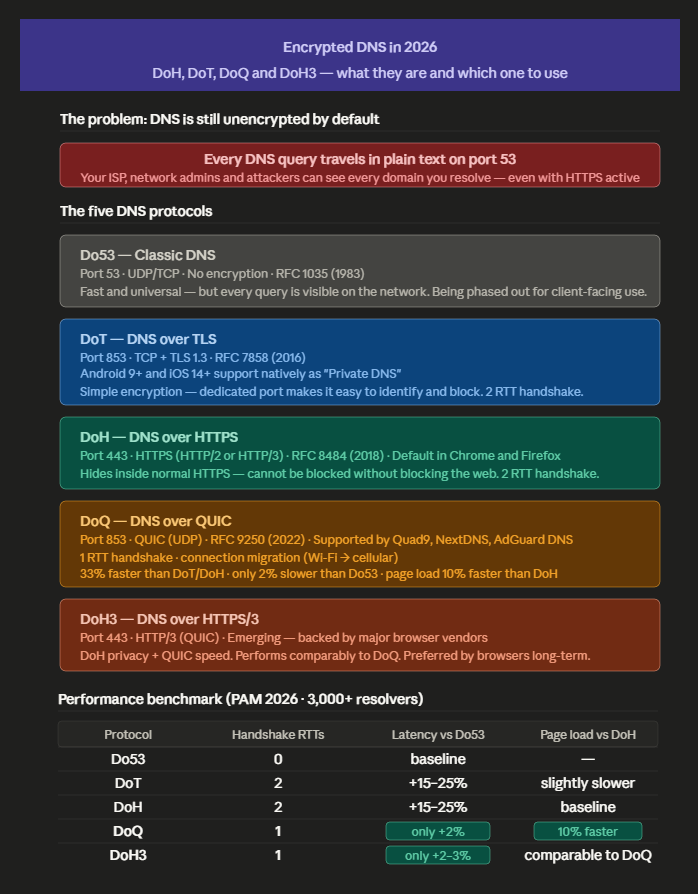
But here is something most website owners don’t know: every DNS query your visitors make is sent in plain text by default. That means your ISP, network administrators, and anyone monitoring the connection can see exactly which domains are being resolved — even when the page content itself is protected by HTTPS. This is the problem that encrypted DNS was designed to solve.
In practice, there are four protocols that replace unencrypted DNS: DNS over HTTPS (DoH), DNS over TLS (DoT), DNS over QUIC (DoQ), and DNS over HTTPS/3 (DoH3). Each one encrypts your DNS queries using a different transport layer, with different tradeoffs in performance, privacy, and compatibility. If you have ever searched for DoH vs DoT and found conflicting answers, this article explains why — and gives you real benchmark data from over 3,000 resolvers to help you decide which encrypted DNS protocol is right for your website.
Table of Contents
Why Unencrypted DNS Is Still a Problem in 2026
When a visitor types your domain name into their browser, their device sends a DNS query before any connection to your server is established. That query travels over the network in plain text on port 53 — visible to:
- The visitor’s ISP
- Anyone monitoring the local network (coffee shop Wi-Fi, corporate proxies)
- Government-level surveillance infrastructure
- Attackers conducting DNS hijacking
This happens regardless of whether your site uses HTTPS. The HTTPS encryption protects the content of the page. The DNS query that happens before the connection is made is a completely separate, unprotected step.
DNS hijacking exploits this gap: an attacker intercepts the plain-text DNS query and returns a false IP address, redirecting the visitor to a malicious site. Modern browsers mitigate some hijacking scenarios via HTTPS-First Mode and HSTS — but not all.
If the attacker controls the resolver and presents a certificate issued by a compromised or locally-trusted CA (common in corporate proxies, compromised routers, and certain ISP environments), HTTPS provides no protection. Documented campaigns include Sea Turtle (2019), the DNSChanger botnet, and ongoing BGP hijacking incidents targeting ISPs in regions with weaker regulatory oversight.
The encrypted DNS protocols solve this by wrapping the DNS query in a secure transport layer. The question is which one to use, and for what purpose.
The Five DNS Protocols You Need to Know
Do53 — Classic DNS (Unencrypted)
Port: 53 (UDP and TCP) Encryption: None Status: Still dominant, but declining for privacy-sensitive use cases
The original DNS protocol, defined in RFC 1035 in 1983. Fast, simple, universally supported. The problem is that it was designed in an era when the internet was a small academic network — privacy was not a design concern. Every query is sent in plain text. For a full breakdown of port 53 and when DNS uses TCP versus UDP, see our guide to what port DNS uses.
For server-to-server communication in controlled environments (internal networks, data centers), Do53 is still reasonable. For client-facing DNS — the queries your visitors make from their browsers — it should be replaced by one of the encrypted alternatives.
DoT — DNS over TLS
Port: 853 Transport: TCP + TLS 1.3 RFC: 7858 (2016) Encryption: Yes Status: Widely deployed, supported by most major resolvers
DoT wraps DNS queries in TLS — the same encryption layer used by HTTPS. It runs on a dedicated port (853), which makes it easy for network administrators to identify, filter, or block encrypted DNS traffic.
The advantage is simplicity: it is essentially the same encryption model that secures web traffic, applied to DNS. The disadvantage is that the dedicated port makes it easy to detect and block — which is why it has seen limited browser adoption but strong adoption in enterprise and mobile operating systems.
Android 9+ and iOS 14+ support DoT natively as “Private DNS.” If a visitor is using a modern mobile device, there is a reasonable chance their DNS queries are already using DoT — regardless of what your server does.
Performance consideration: DoT requires a TCP three-way handshake plus a TLS handshake before the first query — adding approximately 2 round-trip times of latency on cold connections compared to Do53. In practice, both RFC 7858 (DoT) and RFC 8484 (DoH) specify connection reuse: once established, the connection is kept alive and subsequent queries do not pay the handshake cost again.
The overhead is therefore most relevant in cold-start scenarios — first resolution after idle periods, or environments with very short connection timeouts — rather than in sustained high-frequency DNS operation.
DoH — DNS over HTTPS
Port: 443 Transport: HTTPS (HTTP/2 or HTTP/3) RFC: 8484 (2018) Encryption: Yes Status: Default in Firefox and Chrome; widely adopted
DoH tunnels DNS queries inside standard HTTPS traffic on port 443 — the same port used for all web traffic. This makes it indistinguishable from regular browsing traffic, which means it cannot be selectively blocked without blocking all HTTPS.
This is both its greatest strength and the source of its most significant controversy. Enterprise network administrators who need to monitor and filter DNS traffic — for security policy enforcement — cannot do so when DNS is hidden inside HTTPS. This has led to ongoing tension between browser vendors (who favor DoH) and enterprise security teams (who prefer DoT or local resolvers).
Firefox enabled DoH by default in the United States in 2020, using Cloudflare as the fallback resolver, with a gradual rollout to Canada and other selected regions in subsequent years. As of 2026, Firefox DoH is not enabled by default in all countries — including Brazil.
Chrome followed with a more flexible approach — upgrading to DoH automatically if the user’s existing DNS resolver supports it, without changing the resolver itself.
For website owners: DoH is the protocol most likely to be used by your visitors’ browsers right now. It does not require any server-side configuration — your visitors’ DNS queries are resolved by their browser’s configured DoH resolver before they reach your server.
DoQ — DNS over QUIC
Port: 853 (same as DoT) Transport: QUIC (UDP) RFC: 9250 (2022) Encryption: Yes (TLS 1.3 integrated into QUIC) Status: Emerging — growing resolver support, limited browser adoption
DoQ is the newest major encrypted DNS protocol. It uses QUIC as its transport — the same protocol that powers HTTP/3 — instead of TCP. Like DoT, it runs on port 853 and sends DNS queries directly without HTTP framing overhead.
The performance advantage of DoQ over DoT and DoH comes from QUIC’s architecture: the transport and TLS handshakes are combined into a single 1-RTT operation (compared to 2 RTTs for DoT and DoH over TCP). Additionally, QUIC’s connection migration feature means that DNS resolution continues seamlessly when a device switches networks — from Wi-Fi to cellular, for example — without re-establishing the connection.
The performance numbers are significant:
DoQ outperforms DoT and DoH by approximately 33% in single query response time with Session Resumption enabled. Compared to unencrypted DNS over UDP, DoQ is only approximately 2% slower — making encrypted DNS nearly as fast as unencrypted DNS.
Page load times with DoQ are 10% faster compared to DoH. Compared to plain UDP DNS, DoQ performs only 2% slower, even with the additional encryption overhead.
For context: DoH over TCP requires 2 round-trips for handshake before the first query. DoQ requires 1 round-trip. On a connection with 50ms latency, that is 50ms saved on every cold DNS lookup — multiplied by the number of DNS queries needed to load a modern webpage (typically 20 or more for complex sites).
Current adoption: Quad9, NextDNS, and AdGuard DNS all support DoQ. Cloudflare and Google do not yet offer production DoQ resolvers. DoQ is a newer protocol using QUIC with lower latency than DoT, but supported by fewer providers than DoH.
DoH3 — DNS over HTTPS/3
Port: 443 Transport: HTTP/3 (QUIC) Status: Emerging, backed by major browser vendors
DoH3 is DoH running over HTTP/3 instead of HTTP/2. Since HTTP/3 itself runs on QUIC, DoH3 gets the same connection performance benefits as DoQ — 1-RTT handshake, connection migration, no head-of-line blocking — while maintaining the censorship-resistance advantage of running on port 443.
Research across more than 3,000 DoE resolvers demonstrates that DoQ and DoH3 perform comparably, with DoQ slightly outperforming on average. Despite broader feature adoption by DoQ, major browsers currently favor DoH3.
The distinction between DoQ and DoH3 is subtle from a performance perspective. The practical difference for most users is deployment: DoH3 is more likely to be supported by browser vendors because it builds on the existing DoH infrastructure with HTTP/3 as the transport layer upgrade.
We recommend this other article about how to fix slow DNS lookup.
Performance Comparison: What the Research Says
The most comprehensive independent benchmark of encrypted DNS protocols was published in the PAM 2026 proceedings (Springer, March 2026), analyzing more than 3,000 resolvers across multiple continents. Here is what the data shows:
| Protocol | Handshake RTTs | Single Query Latency vs Do53 | Page Load vs DoH | Connection Migration |
|---|---|---|---|---|
| Do53 (UDP) | 0 | Baseline | — | No |
| DoT | 2 | +15–25% | Slightly slower | No |
| DoH (HTTP/2) | 2 | +15–25% | Baseline | No |
| DoQ | 1 | +2% | 10% faster | Yes |
| DoH3 | 1 | +2–3% | Comparable to DoQ | Yes |
The key takeaway: DoQ and DoH3 have essentially closed the performance gap with unencrypted DNS. A 2% latency penalty for full encryption is negligible in the context of the total page load time for any real-world website.
The 10% page load improvement of DoQ over standard DoH comes from two sources: the faster handshake eliminates one RTT, and QUIC’s multiplexing handles the 20+ DNS queries that a complex page generates more efficiently than TCP.
What This Means for Web Hosting and Website Performance
DNS resolution happens before any connection to your server. It is part of your Time to First Byte (TTFB) from the visitor’s perspective. Faster DNS resolution → lower TTFB → better Core Web Vitals → better Google rankings.
The chain is: DNS protocol choice → handshake latency → DNS lookup time → TTFB → LCP/FCP → Core Web Vitals score.
For most websites on shared hosting, the DNS configuration is controlled at three levels:
1. The resolver the visitor uses. This is largely outside your control — it depends on the visitor’s browser settings, operating system, and ISP. Chrome and Firefox default to DoH using their configured resolvers. Android uses DoT via its Private DNS setting.
2. The authoritative DNS server for your domain. This is what your registrar (or Copahost) controls. Authoritative DNS does not need to use encrypted protocols — it speaks to resolvers, not browsers. What matters here is the TTL (Time to Live) configuration and response time.
3. The nameservers you point your domain at. Using Cloudflare’s nameservers (1.1.1.1, 1.0.0.1) means your visitors who use Cloudflare’s resolver get DoH — and Cloudflare’s anycast network provides very fast authoritative lookups from virtually anywhere in the world.
Practical recommendation for website owners:
- Point your domain at nameservers with global anycast infrastructure — Cloudflare, AWS Route 53, or your hosting provider’s DNS if they offer anycast
- Configure reasonable TTLs (3600 seconds for stable records; 300 seconds when planning changes)
- Enable DNSSEC on your domain to prevent DNS spoofing at the authoritative level — this is independent of encrypted transport and protects the integrity of the answer
Infographic
How to Test Your DNS Encryption
Check which protocol your browser is using
In Chrome: go to chrome://net-internals/#dns to see DNS resolution details. For DoH status: chrome://settings/security → “Use secure DNS.”
In Firefox: about:config → search network.trr.mode. Values: 0 = off, 2 = DoH with fallback, 3 = DoH only.
Test your current DNS leak
Visit dnsleaktest.com and run the extended test. If results show only your configured DoH/DoT resolver, you are not leaking. If results show your ISP’s resolver, your DNS is not fully encrypted.
Benchmark DNS protocols yourself
# Install dnsdiag for protocol comparison
pip install dnsdiag

# Compare Do53 vs DoH vs DoT for the same query
dnsping -s 1.1.1.1 -c 10 copahost.com          # Do53
dnsping -s https://1.1.1.1/dns-query -c 10 copahost.com   # DoH
dnsping -s tls://1.1.1.1 -c 10 copahost.com    # DoT
dnsping -s quic://dns.nextdns.io -c 10 copahost.com  # DoQ
Configuring Encrypted DNS on Your Server
nginx — upstream resolver configuration
It is important to clarify a common misconception: nginx does not natively support DoH or DoT for upstream DNS resolution. The resolver directive in nginx.conf specifies which DNS server nginx uses internally for resolving upstream hostnames — but it communicates with that resolver over standard unencrypted Do53 (UDP port 53), regardless of whether the resolver itself supports DoH.
# nginx.conf — this sets the upstream resolver, but uses plain Do53 (UDP)
# NOT encrypted DNS — despite pointing at 1.1.1.1
resolver 1.1.1.1 1.0.0.1 valid=300s;
resolver_timeout 5s;
To encrypt nginx’s upstream DNS lookups, the correct approach is to run a local encrypted DNS proxy — such as stubby or dnsproxy — that listens on localhost and forwards queries upstream via DoT or DoH. nginx then resolves against 127.0.0.1:
# Install stubby (DoT proxy)
apt install stubby   # Debian/Ubuntu
yum install stubby   # CentOS/RHEL
# /etc/stubby/stubby.yml — minimal DoT config via Cloudflare
resolution_type: GETDNS_RESOLUTION_STUB
dns_transport_list:
- GETDNS_TRANSPORT_TLS
tls_authentication: GETDNS_AUTHENTICATION_REQUIRED
listen_addresses:
- 127.0.0.1@53
upstream_recursive_servers:
- address_data: 1.1.1.1
tls_auth_name: "cloudflare-dns.com"
- address_data: 1.0.0.1
tls_auth_name: "cloudflare-dns.com"# nginx.conf — now resolves via local stubby proxy (encrypted DoT upstream)
resolver 127.0.0.1 valid=300s;
resolver_timeout 5s;After configuring stubby, restart both services:
systemctl restart stubby
systemctl reload nginx
This setup encrypts nginx’s upstream DNS lookups via DoT to Cloudflare — which is what the previous configuration incorrectly implied the resolver directive was doing directly.
Using Cloudflare’s DNS resolver (anycast, supports DoH/DoT)
| Protocol | Address |
|---|---|
| Do53 | 1.1.1.1 and 1.0.0.1 |
| DoT | tls://1.1.1.1 (port 853) |
| DoH | https://1.1.1.1/dns-query |
| DoH3/DoQ | Supported via browser auto-upgrade |
Enabling DNSSEC on your domain (cPanel)
In cPanel → Zone Editor → select your domain → DNSSEC → Enable. This signs your DNS records cryptographically, preventing spoofing at the authoritative level. Note: DNSSEC is separate from encrypted transport — it protects data integrity, not query privacy.
Limits of Encrypted DNS
Encrypted DNS is not a complete privacy solution. Being precise about what it protects and what it does not is important:
What encrypted DNS protects: the content of DNS queries — which domain names are being resolved — from passive observers on the network path between the client and the resolver.
What it does not protect:
- Destination IP addresses: once DNS resolves a domain, the connection goes to the IP. The IP is visible even without seeing the DNS query.
- SNI (Server Name Indication): unless Encrypted Client Hello (ECH) is also deployed, the domain name leaks in the TLS handshake. ECH, standardized in RFC 9849, is the complement to encrypted DNS that closes this gap. Without additional measures such as Encrypted Client Hello (ECH), the TLS handshake may leak the Server Name Indication (SNI). ECH adoption reduces that leak.
- Traffic analysis: volume and timing of connections can still reveal browsing patterns even with all transport encryption in place.
Which Protocol Should You Use?
| Scenario | Recommended protocol |
|---|---|
| Personal privacy on public Wi-Fi | DoQ (Quad9 or NextDNS) or DoH (Cloudflare) |
| Enterprise network with monitoring needs | DoT to controlled resolver |
| Browser default (no configuration) | DoH — already default in Chrome/Firefox |
| Mobile devices (Android/iOS) | DoT via system Private DNS setting |
| Maximum performance + privacy | DoQ via NextDNS or Quad9 |
| Website/server DNS resolver | Anycast Do53 with DNSSEC (Cloudflare or Route 53) |
The short answer for most website owners: you do not need to configure anything for your visitors’ DNS queries — modern browsers handle this automatically. What you can control is the authoritative DNS for your domain (use Cloudflare’s nameservers for best performance) and DNSSEC (enable it in your registrar or cPanel).
Summary
The four encrypted DNS protocols — DoT, DoH, DoQ and DoH3 — each solve the plain-text DNS problem with different tradeoffs. DoH is the current standard in browsers. DoQ and DoH3 are the performance-optimized next generation, with research showing they have essentially closed the gap with unencrypted DNS while adding full privacy protection.
For website owners, the most actionable steps are DNSSEC activation on your domain and using an authoritative DNS provider with global anycast infrastructure. For end users who care about privacy, DoQ via Quad9 or NextDNS is the best option available today.
Sources
- PAM 2026 — The Future of DNS Privacy: A Comparison of DNS over QUIC and DNS over HTTP/3: https://link.springer.com/chapter/10.1007/978-3-032-18268-5_10
- Catchpoint — DNS over QUIC (DoQ) Working and Implementation Guide: https://www.catchpoint.com/http2-vs-http3/dns-over-quic
- packet.guru — DNS Encryption in 2026: Practical Guide to DoH, DoT, DoQ and Private DNS: https://packet.guru/blog/DNS-Encryption-in-2026
- NextDNS Help Center — What is DoT, DoQ and DoH: https://help.nextdns.io/t/x2hmvas
- State of Surveillance — Best Encrypted DNS May 2026: https://stateofsurveillance.org/guides/technical/encrypted-dns-comparison/
- linkconfig — DNS over QUIC and DNS over HTTPS/3: https://linkconfig.com/blog/dns-over-quic-doh3-encrypted-dns/
- RFC 9250 — DNS over Dedicated QUIC Connections: https://datatracker.ietf.org/doc/html/rfc9250
- RFC 9849 — TLS Encrypted Client Hello: https://datatracker.ietf.org/doc/html/rfc9849
Copahost provides web hosting and domain registration with DNSSEC support on all registered domains. For a foundational understanding of how DNS works, see our guide: What does DNS stand for?
