
A cache plugin is one of the fastest ways to speed up a WordPress site — it can cut your load time in half without a single line of code. But with a dozen options promising the same thing, which one should you actually install? This guide compares the best WordPress cache plugins in 2026, free and paid, with honest pros and cons for each. We’ll also explain how caching works, how to pick the right plugin for your setup, and why the type of hosting you’re on changes the answer.
Table of Contents
What a cache plugin actually does
Every time someone visits a WordPress page, the server runs PHP and queries the database to build that page from scratch. That work takes time. A cache plugin saves a ready-made, static HTML copy of your pages and serves that instead — so the server skips the heavy lifting and the page loads almost instantly.
Good caching plugins do more than page caching. The main types of caching they handle:
- Page caching — stores the full HTML of a page (the biggest speed win).
- Browser caching — tells visitors’ browsers to keep static files (logos, CSS) locally so repeat visits are faster.
- Object caching — caches the results of database queries, useful for dynamic sites.
- Minification — strips unnecessary characters from CSS and JavaScript to shrink file sizes.
Faster pages mean better Core Web Vitals, lower bounce rates, and a ranking edge in Google — which is why caching is one of the highest-impact changes you can make.
Some hosting runs caching at the server level (for example, LiteSpeed servers), which is faster than any plugin because it serves pages before PHP even loads. On that kind of hosting, the matching plugin — like LiteSpeed Cache — simply connects to the server cache and gives you the best of both. If your host doesn’t offer server-level caching, a plugin is essential.
The best WordPress cache plugins in 2026
Here are the strongest options, with what each does well and where it falls short.
1. LiteSpeed Cache — best free plugin (especially on LiteSpeed hosting)
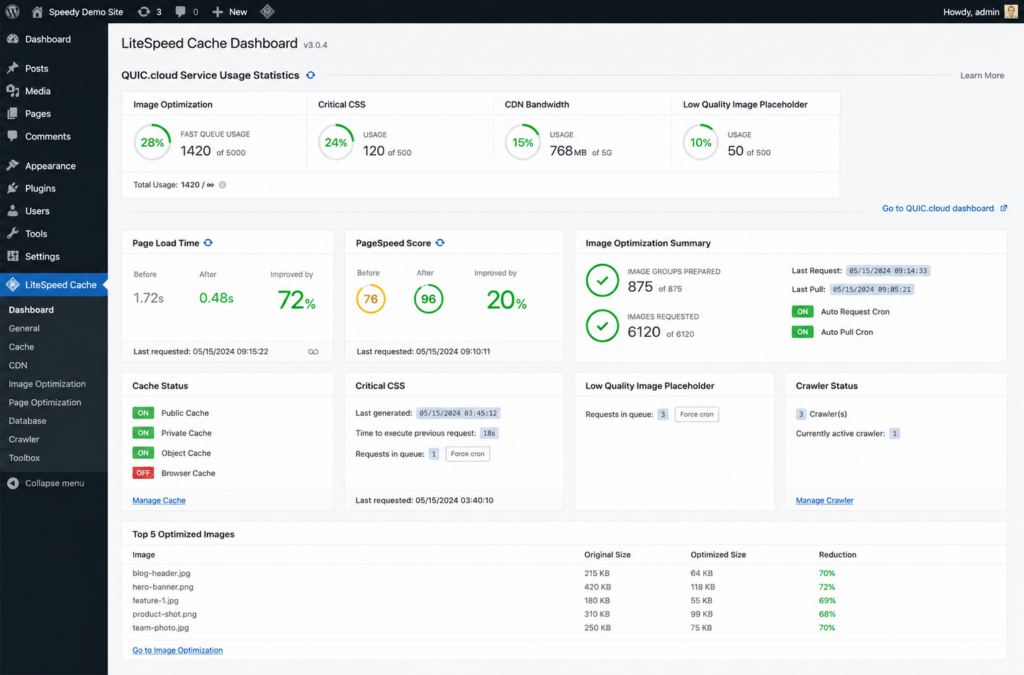
LiteSpeed Cache is a free, full-featured plugin that handles page caching, object caching, image optimization, CSS/JS minification, and lazy loading. Its big advantage: when your site runs on a LiteSpeed server, the plugin taps directly into the server’s built-in cache — delivering performance that matches or beats premium plugins, at no cost.
Pros: completely free, all-in-one features, exceptional performance on LiteSpeed servers, actively developed.
Cons: you get the full benefit only on LiteSpeed-based hosting; the settings can feel dense at first.
Because Copahost runs on LiteSpeed, LiteSpeed Cache is the natural first choice for sites hosted here — top-tier speed without paying for a plugin.
2. WP Rocket — best paid plugin (easiest setup)
WP Rocket is the most popular premium cache plugin, built around simplicity. It turns on page caching, browser caching, GZIP compression, and lazy loading the moment you activate it — no configuration required. Beyond the defaults, it handles CSS/JS optimization, database cleanup, and preloading from one clean settings panel.
Pros: works instantly with smart defaults, beginner-friendly, strong support and documentation, reliable across themes and plugins.
Cons: paid only (starts around $59/year), not in the free WordPress repository (you upload it manually).
If you’re not on LiteSpeed hosting and want the least-effort route to a fast site, WP Rocket is the safe pick.
3. W3 Total Cache — most configurable free plugin
Around since 2009, W3 Total Cache (W3TC) supports more caching methods than anything else on this list: page, object, database, and fragment caching, plus Redis/Memcached, minification, and CDN integration.
Pros: free, extremely powerful, supports advanced object caching (Redis/Memcached), works on any hosting type.
Cons: famously complex — 16 pages of settings; wrong choices can conflict or even slow the site down. Best for technical users.
Choose W3TC if you want deep control and are comfortable tuning settings carefully.
4. WP Super Cache — simplest free option
Maintained by Automattic (the company behind WordPress.com and WooCommerce), WP Super Cache focuses on straightforward page caching. It generates static HTML files and serves them in place of the heavier PHP scripts.
Pros: free, simple, trusted maintainer, good for smaller sites that just need basic page caching.
Cons: limited features beyond page caching — no modern CSS/JS or image optimization; development has slowed.
A solid, no-frills choice for a small blog or brochure site.
5. WP Fastest Cache — beginner-friendly
WP Fastest Cache is lightweight and easy, offering page caching, minification, and GZIP with a simple interface. A free version covers the basics; a premium tier adds image optimization and more.
Pros: very easy to use, clean interface, decent free tier.
Cons: fewer advanced features than the leaders; the most modern optimizations sit behind the paid version.
6. WP-Optimize — best all-in-one free tool
WP-Optimize combines page caching with database cleanup and image compression in one plugin — a strong all-round performance tool rather than a pure cache plugin.
Pros: free version bundles caching, database optimization, and image compression; good value.
Cons: the combined approach means less depth in each area than a specialized plugin.
Comparison table
How to choose the right cache plugin
The best plugin depends mostly on your hosting and your comfort with settings:
- On LiteSpeed hosting (like Copahost): use LiteSpeed Cache. It connects to the server cache for premium-level speed, free.
- Want the easiest possible setup and don’t mind paying: WP Rocket. Activate and you’re done.
- Free and you’re technical: W3 Total Cache for maximum control, or WP-Optimize for an easy all-in-one.
- Small site that just needs basic caching: WP Super Cache or WP Fastest Cache.
Installing two caching plugins together doesn’t double your speed — it creates conflicts that can slow your site or make it inaccessible. Pick one, and if you switch, fully deactivate and delete the old one first. The same goes for aggressive CSS/JS minification: enable those options one at a time and test, since they’re the most common cause of layout bugs.
A caching plugin isn’t magic — hosting matters
A cache plugin can only do so much on slow hosting. Caching sits on top of your server: if the underlying hardware, PHP version, and server software are slow, the plugin is patching over a weak foundation. That’s why the fastest WordPress sites pair a good cache setup with quality hosting — ideally on modern infrastructure with server-level caching built in.
Copahost runs on LiteSpeed with server-level caching, so the free LiteSpeed Cache plugin delivers premium speed out of the box — plus free SSL, NVMe storage, and support that helps you get Core Web Vitals in the green.
See web hosting plansFrequently asked questions
What is the best WordPress cache plugin?
It depends on your hosting. On LiteSpeed-based hosting, LiteSpeed Cache is the best option and it’s free. If you’re not on LiteSpeed and want the easiest setup, WP Rocket is the top paid choice. W3 Total Cache is the most configurable free option for technical users.
Do I really need a cache plugin?
In most cases, yes. Without caching, WordPress rebuilds every page from scratch on each visit, which is slower and heavier on the server. A cache plugin serves fast static versions instead, improving load times and Core Web Vitals. The exception is hosting that already provides full server-level caching.
Is a free cache plugin good enough?
Often, yes. LiteSpeed Cache (on LiteSpeed servers) and W3 Total Cache can match paid plugins in raw performance. The difference with paid options like WP Rocket is mainly ease of use, support, and turnkey features — you pay to save configuration time.
Can I use two cache plugins at the same time?
No. Running two caching plugins causes conflicts that can slow your site or break it. Use only one, and fully remove any previous cache plugin before installing another.
Does a cache plugin help SEO?
Indirectly, yes. Faster load times improve Core Web Vitals, which are a Google ranking factor, and reduce bounce rates. A cache plugin is one of the simplest ways to improve those speed signals.
Related guides
Speed is more than caching — see our guides on Core Web Vitals, the wp-config.php file (where the WP_CACHE constant lives), the .htaccess file for compression and browser caching rules, and our hub of common WordPress errors.
Conclusion
The best WordPress cache plugin isn’t the same for everyone — it comes down to your hosting and how much you want to tinker. On LiteSpeed hosting, LiteSpeed Cache gives you premium speed for free. If you want zero-effort setup and don’t mind paying, WP Rocket is the easiest path. For free control, W3 Total Cache and WP-Optimize are strong. Whatever you choose, install only one, test after enabling optimizations, and remember that caching works best on a fast server to begin with.
