
SSD and NVMe both store your website’s data on fast flash memory with no moving parts — but they’re not the same thing. “SSD hosting” usually means a SATA SSD, while NVMe is a newer, much faster type of SSD that connects directly to the server’s PCIe bus. The short version: NVMe is a kind of SSD, and it’s dramatically faster — often 6 to 12 times the speed of a traditional SATA SSD.
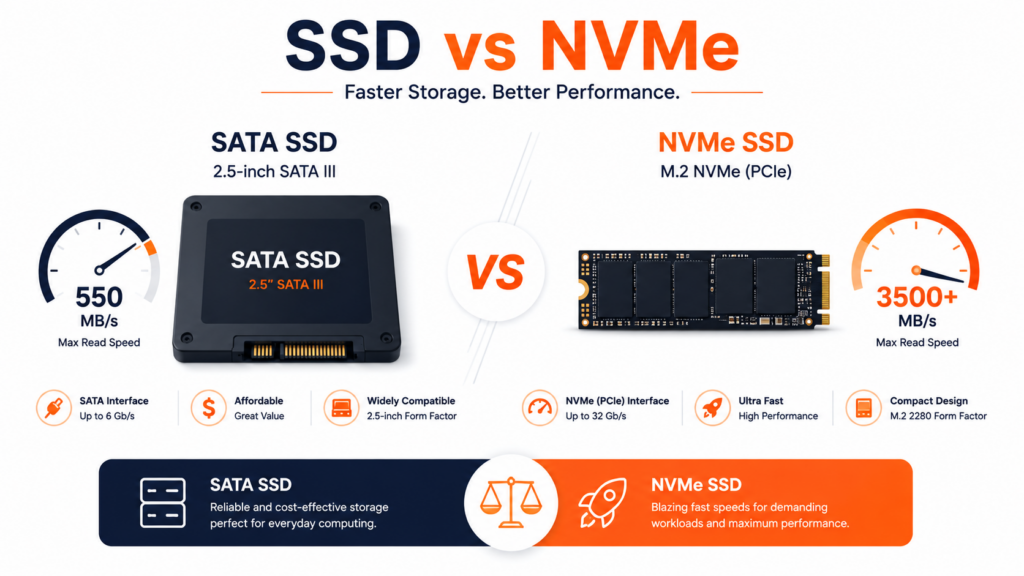
When you compare hosting plans, you’ll see “SSD” and “NVMe” advertised as if they were rival options. They’re related, but the performance gap between them is bigger than most people expect — and it directly affects how fast your site loads. This guide explains what each one is, why NVMe is faster, the real-world difference, and which to choose. For the bigger picture, see our guide on what web hosting is.
Table of Contents
SSD and NVMe: the quick answer
The key thing to understand up front: NVMe is a type of SSD. Both are solid-state drives — they store data on flash memory chips and have no moving parts, which makes them far faster and more reliable than old mechanical hard drives (HDDs). The difference is how they connect to the server:
- A SATA SSD (what “SSD hosting” usually means) connects through the older SATA interface, originally designed for mechanical hard drives.
- An NVMe SSD connects through the much faster PCIe bus, using a protocol built specifically for flash storage.
So “SSD vs NVMe” really means “SATA SSD vs NVMe SSD” — an older, slower connection versus a newer, faster one.
What is an SSD (SATA SSD)?
A Solid State Drive (SSD) stores data on NAND flash memory instead of the spinning magnetic platters of a traditional hard drive. With no moving parts, it reads and writes data far faster than an HDD — typically 50 to 100 times the operations per second — which is why SSD hosting became the standard and made websites noticeably quicker.
When a host advertises plain “SSD hosting,” it almost always means a SATA SSD: a solid-state drive connected via the SATA III interface. SATA tops out at around 500–600 MB/s in practice, and it uses the AHCI protocol, which was originally designed for mechanical disks. It’s fast and reliable — a huge upgrade over HDD — but it carries the limits of an older connection.
What is NVMe?
NVMe (Non-Volatile Memory Express) is a newer storage technology designed specifically for flash. Instead of the SATA interface, an NVMe drive connects directly to the server’s PCIe bus, the same high-speed pathway used by graphics cards and other performance components. This removes the bottleneck of the old SATA connection.
The result is dramatic: NVMe drives reach roughly 3,500 MB/s (PCIe Gen3) up to 7,000 MB/s (Gen4) — many times faster than a SATA SSD. NVMe also uses a protocol built for flash, with far lower latency because it talks more directly to the CPU. In hosting terms, NVMe is simply a faster, more efficient kind of SSD.
Those speed figures depend on the PCIe generation the drive uses. Each generation roughly doubles the available bandwidth: PCIe Gen3 NVMe reaches around 3,500 MB/s, Gen4 around 7,000 MB/s, and the newest Gen5 drives go higher still. For web hosting, even Gen3 NVMe is far beyond what a SATA SSD can do, so any NVMe is a major step up — the generation mainly determines just how much headroom you have.
Why is NVMe faster than a SATA SSD?
The speed gap isn’t a small tuning difference — it’s structural. Three things make NVMe faster:
Wider connection (PCIe vs SATA): the PCIe bus moves far more data per second than the SATA interface, which was built for slower mechanical drives. A protocol built for flash: NVMe uses a streamlined command set designed for solid-state storage, removing the legacy overhead AHCI carried over from spinning disks. Massive parallelism: SATA was designed around a single queue (one mechanical platter doing one thing at a time), while NVMe handles thousands of parallel I/O queues — perfect for a server juggling many requests at once. Together, these mean NVMe doesn’t just edge out SATA SSD; it operates on a different level.
One metric worth knowing is IOPS (Input/Output Operations Per Second) — how many separate read/write operations the drive can handle each second. This often matters more than raw MB/s for websites, because database-driven sites generate huge numbers of small operations rather than a few large file transfers. A SATA SSD handles tens of thousands of IOPS; an NVMe drive handles hundreds of thousands to over a million. That’s why NVMe feels especially fast on busy WordPress and e-commerce sites: it’s not just moving more data, it’s handling far more simultaneous requests.
SSD vs NVMe: side-by-side comparison
Here’s the comparison at a glance:
SSD vs NVMe: side-by-side comparison
What the difference means for your website
Numbers like “7,000 MB/s” only matter if they translate into something real — and they do, especially for database-driven sites (which means almost every modern website: WordPress, online stores, anything with logins or dynamic content). Every page view triggers storage reads and writes, so faster storage shows up as:
- Faster page loads, particularly the server response time (TTFB) that affects both user experience and SEO.
- Quicker database queries — the kind that pile up on busy WordPress or e-commerce sites.
- Better handling of traffic spikes, because the storage can serve many simultaneous requests without becoming the bottleneck.
- Faster background tasks — backups, imports, and scheduled jobs finish in a fraction of the time, freeing server resources for real visitors.
The effect is biggest on sites that hit storage often. A small static site may barely notice; a busy database-driven site can feel substantially snapper on NVMe. Storage speed is one piece of overall performance, alongside things like a good CDN and reliable uptime.
SSD vs NVMe vs HDD: where each fits
To put it in context, here’s the full storage ladder:
- HDD (Hard Disk Drive): mechanical, with spinning platters. Cheap and high-capacity, but slow — largely obsolete for web hosting today.
- SATA SSD: flash storage on the older SATA connection. A major leap over HDD, reliable, and still perfectly good for many sites.
- NVMe SSD: flash storage on the PCIe bus. The fastest mainstream option, ideal for performance-sensitive and database-heavy sites.
The trend is clear: HDD is gone from quality hosting, SATA SSD is the baseline, and NVMe is the new performance standard.
Two more details worth a mention. NVMe drives come in different form factors — the small M.2 stick (common in laptops and many servers), U.2 (used in enterprise servers), and add-in PCIe cards — but for you as a hosting customer, what matters is that it’s NVMe, not the physical shape.
And in quality hosting, fast storage is usually combined with RAID (such as RAID-10), which mirrors data across multiple drives. That means you get NVMe’s speed and redundancy — if one drive fails, your data is safe on another, supporting both performance and reliability.
Which should you choose?
For most websites today, NVMe is the better choice when it’s available — it’s faster across the board, and the price gap has narrowed to the point where there’s little reason to prefer older SATA SSD storage. Here’s a simple way to think about it:
- Small, static, low-traffic sites: a SATA SSD is perfectly adequate; you may not notice a huge difference.
- WordPress, business sites, online stores: NVMe is well worth it — these are database-driven and benefit directly from faster storage.
- High-traffic or resource-heavy sites: NVMe is the clear pick, since storage speed becomes a real bottleneck under load.
The practical advice: if a host offers NVMe at a similar price, choose it. You’re getting meaningfully faster storage for little or no extra cost. When comparing plans, NVMe is one of the clearest signals of modern, performance-focused hosting.
Common misconceptions
A couple of myths trip people up when comparing SSD vs NVMe:
- “NVMe and SSD are completely different things.” Not quite — NVMe is an SSD. The difference is the interface (PCIe vs SATA) and protocol, not whether it’s solid-state.
- “NVMe will make any site dramatically faster.” It helps most for database-driven and high-traffic sites. A tiny static page won’t transform, because storage isn’t its bottleneck — but most real-world sites do benefit.
- “SSD hosting is outdated.” SATA SSD is still fast and reliable for many sites; it’s just no longer the fastest option. NVMe is the upgrade, not a fix for something broken.
Frequently asked questions about SSD vs NVMe
Is NVMe better than SSD?
NVMe is a type of SSD — a faster one. Compared with a traditional SATA SSD, NVMe is dramatically quicker because it connects through the PCIe bus instead of the older SATA interface. So “NVMe vs SSD” really means “NVMe SSD vs SATA SSD,” and NVMe wins clearly on speed and latency.
How much faster is NVMe than a SATA SSD?
A lot. SATA SSDs reach about 500–600 MB/s, while NVMe drives reach roughly 3,500 MB/s (PCIe Gen3) up to 7,000 MB/s (Gen4) — around 6 to 12 times faster. NVMe also has much lower latency and handles far more parallel requests, which matters for busy servers.
Is NVMe a type of SSD?
Yes. Both NVMe and SATA SSDs are solid-state drives that store data on flash memory with no moving parts. The difference is the connection: a SATA SSD uses the older SATA interface, while NVMe uses the faster PCIe bus with a protocol built for flash. So all NVMe drives are SSDs, but not all SSDs are NVMe.
Do I need NVMe hosting for my website?
It depends on your site. For database-driven sites (WordPress, online stores) and high-traffic sites, NVMe makes a real, noticeable difference. For small static or low-traffic sites, a SATA SSD is fine. That said, when NVMe is available at a similar price, it’s worth choosing for the headroom.
Does NVMe improve SEO?
Indirectly, yes. NVMe speeds up server response time (TTFB) and overall page load, and site speed is a Google ranking factor through Core Web Vitals. NVMe won’t fix a poorly built site, but as part of fast hosting it supports the performance metrics that influence rankings.
Is NVMe more expensive than SSD?
It used to carry a clear premium, but the gap has narrowed significantly. Many hosts now offer NVMe at prices very close to SATA SSD plans. Given the large speed advantage, NVMe usually offers better value when the price difference is small.
Copahost hosting runs on NVMe storage, so your site loads faster and your database queries fly — with free SSL, a free control panel, and real support included. Performance built in from the start.
Explore hosting plansConclusion
SSD vs NVMe comes down to this: both are fast solid-state storage, but NVMe is a newer kind of SSD that connects through the PCIe bus and runs many times faster than a traditional SATA SSD. For database-driven and high-traffic websites, that speed translates into quicker page loads, faster queries, and better performance under load — with an indirect SEO benefit too.
SATA SSD is still solid for smaller sites, but NVMe has become the performance standard, and when it’s available at a similar price, it’s the smart choice. At Copahost, our hosting runs on NVMe storage, so your site gets that speed advantage from the start.
