
Your domain name is your address on the internet. It’s what people type to find you, what they remember after visiting your site, and — whether you like it or not — part of your brand’s first impression. Choosing the wrong one can hold you back. Choosing the right one can set you up for years.
This guide walks you through everything you need to know about how to choose a domain name that works for your business, project, or personal site.
Table of Contents
Why Your Domain Name Matters More Than You Think
Before we get into the practical tips, it’s worth understanding what’s at stake.
A domain name affects:
- Memorability — Can people remember it after hearing it once?
- Trust — Does it look professional and legitimate?
- SEO — Does it give search engines context about what your site is about?
- Branding — Does it represent your business identity consistently?
A name like bestaffordableplusbakeryshopnearme.com might tick a few keyword boxes, but nobody is going to remember it, type it correctly, or trust it. On the other hand, paulasbakery.com is clean, brandable, and easy to share.
If you’re worried that your chosen name doesn’t perfectly describe what you do, don’t be — some of the most valuable companies in the world succeeded with names that meant nothing at first.
Google, for instance, was originally called “BackRub” when Larry Page and Sergey Brin built it as a Stanford research project in 1996, because the engine analysed the “back links” pointing to a website.
They only switched to “Google” — a play on the mathematical term googol (the number 1 followed by 100 zeros) — a year later. Spotify is another example: the name is a completely invented word, reportedly born from a misheard suggestion during an early brainstorming session, and it carries no literal meaning at all.
The same goes for brands like Zalando, Skype, and Häagen-Dazs — all invented or abstract names that became instantly recognisable through branding, not because the word described the product. The lesson? A short, distinctive, brandable name almost always beats a long, descriptive, keyword-stuffed one. Your name doesn’t have to explain your business — your business will give the name its meaning.
1. Start With Your Brand, Not Your Keywords
The biggest mistake beginners make is trying to stuff keywords into their domain name for SEO purposes. This was common advice in the early 2000s — it no longer works the way it used to, and it often backfires.
Google has become sophisticated enough to rank squarespace.com for “website builder” without the word appearing in the domain. Your content, authority, and backlinks matter far more than a keyword in your URL.
Instead, ask yourself:
- What is the name of my business or project?
- What feeling or identity do I want the name to convey?
- Will this name still make sense in five years?
If you’re building a brand, your domain name should reflect that brand — not a list of services.
2. Keep It Short and Simple
The shorter, the better. As a general rule:
- Aim for under 15 characters if possible
- Avoid hyphens — they’re easy to forget and look unprofessional (
best-web-hosting.comvsbestwebhosting.com) - Avoid numbers — they create confusion (is it
5orfive?) - Use words people can spell — if you have to spell it out loud every time, it’s too complicated
Test it with the “radio test”: if someone heard your domain name on a podcast or radio show, would they be able to type it correctly without asking you to repeat it? If not, simplify it.
3. Choose the Right Domain Extension
The extension — or TLD (Top-Level Domain) — is the part after the dot. .com, .net, .org, .io, and country-specific extensions like .co.uk or .pt are the most common.
Here’s a simple guide:
.com
First choice for any commercial business — most trusted globally
.net
Technology or network-related businesses
.org
Non-profits, communities, open-source projects
.io
Tech startups and SaaS products
.co.uk / .pt / .es
Businesses targeting a specific country
.store / .shop
E-commerce focused sites
.blog / .site
Personal blogs or general websites
.com is still king. If your preferred .com is available, register it. If it’s taken, consider a country-specific extension if your audience is local, or explore creative alternatives — but avoid obscure extensions that users won’t recognise or trust.
4. Make Sure It’s Unique and Available
Before you fall in love with a name, check:
- Is the domain available? Use a domain search tool to verify.
- Is the name trademarked? Using a trademarked name can lead to legal issues down the line.
- Is it being used on social media? Consistency across your domain and social handles (Instagram, X, LinkedIn) strengthens your brand.
- Does it have a negative history? If you’re buying a previously registered domain, check its backlink profile and whether it was ever penalised by Google. Tools like SEMrush or Ahrefs can help.
A quick Google search of the name you’re considering can also reveal whether a similar business already exists, which could cause confusion for your audience.
5. Use AI to brainstorm domain name ideas
If you’re struggling to come up with the right name, AI tools like ChatGPT or Gemini can be surprisingly useful brainstorming partners. Simply describe your business in a sentence — what it does, who it’s for, and the tone you want (professional, playful, minimal) — and ask for domain name suggestions.
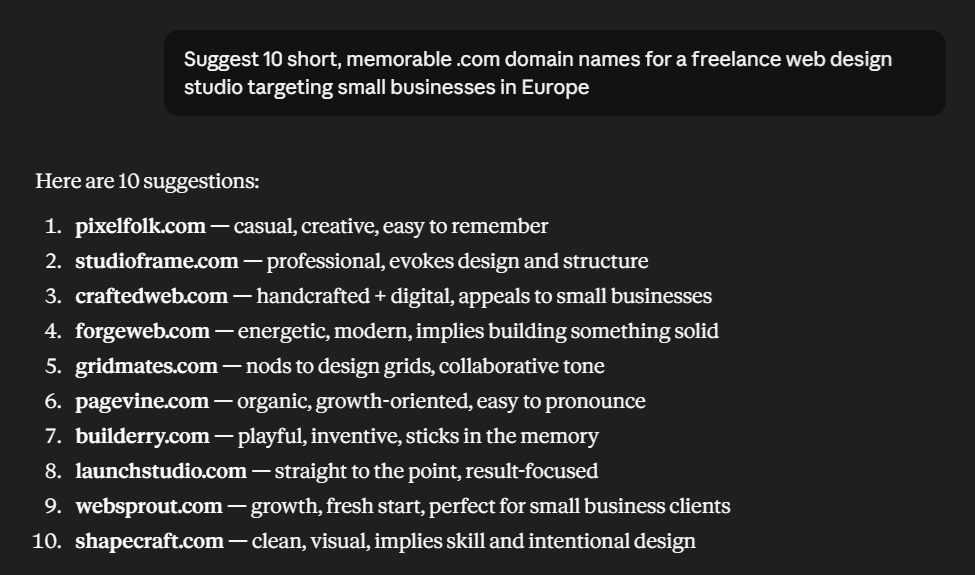
For example: “Suggest 10 short, memorable .com domain names for a freelance web design studio targeting small businesses in Europe.” The AI will generate a list of ideas in seconds, which you can then filter, combine, or use as inspiration.
You can also ask it to check whether a name is easy to pronounce, has any unintended meanings in other languages, or feels too similar to an existing brand. It won’t tell you whether a domain is actually available — for that you still need a domain registrar like Copahost — but as a creative starting point, it saves hours of staring at a blank page.
6. Avoid Trademark and Copyright Issues
This point deserves its own section. Do not register a domain that:
- Includes the name of an existing brand (e.g.
nikestore.com,applesupport.net) - Is a slight misspelling of a well-known brand (these are called “typosquatting” domains and are illegal in many jurisdictions)
- Uses a celebrity or public figure’s name
Even if the domain is technically available, you could receive a cease-and-desist letter and lose the domain — and any SEO equity you built on it.
7. Think About the Future
Your domain name is a long-term commitment. Changing it later means losing SEO rankings, rebuilding brand recognition, and updating every piece of marketing material you’ve ever created.
Ask yourself:
- Am I limiting myself geographically?
londonplumber.comis great until you expand to Manchester. - Am I limiting myself by product?
bestiphonecases.combecomes a problem when you start selling Android cases. - Is this name evergreen? Trend-based names (
nftstore.io, anyone?) can age badly.
Choose a name that gives your business room to grow.
8. Get a Second Opinion
You’re too close to your own idea to evaluate it objectively. Before registering, share the name with:
- Friends or colleagues outside your industry
- Potential customers if you have access to them
- Someone who speaks English as a second language, to check for awkward pronunciations or unintended meanings
This last point matters more than people realise. A domain that looks fine in one language can mean something entirely different — or embarrassing — in another. Always check.
9. Register Your Domain Quickly
Good domain names get taken fast. Once you’ve found a name you’re happy with, register it before someone else does. Domain registration is inexpensive — typically between €8 and €15 per year for a .com — so the cost of waiting is never worth it.
At Copahost, domain registration is included free for the first year with any shared hosting plan. This means you can secure your domain name and get your website online in the same step, without paying separately for both.
Found the perfect name? Don’t wait — register it now
Get your domain free for the first year with any Copahost shared hosting plan, starting from just €1.99/month.
10. Consider Registering Multiple Variations
Once you’ve chosen your main domain, it’s worth protecting your brand by registering:
- Common misspellings of your domain
- The same name with different extensions (
.com,.net,.co.uk) - Hyphenated versions if your name is two words
You don’t need to build separate websites on all of them — simply redirect them to your main domain. This protects you from competitors or bad actors registering similar names and capturing your traffic.
11. A Quick Checklist Before You Register
Before hitting the register button, run through this final checklist:
- [ ] It’s short (ideally under 15 characters)
- [ ] No hyphens or numbers
- [ ] Easy to spell and pronounce
- [ ] Passes the radio test
- [ ]
.comis available, or a suitable alternative - [ ] Not trademarked by another company
- [ ] Consistent with your social media handles
- [ ] Makes sense in five years, not just today
- [ ] You’ve checked for negative connotations in other languages
FAQ
How long should a domain name be?
Ideally under 15 characters. Shorter domains are easier to remember, type, and share. While there’s no strict technical limit (a domain can be up to 63 characters), the most successful brands keep their names short and memorable.
Should I buy a .com or a country-specific domain?
If your audience is global or you want maximum trust, .com is the safest choice. If your business serves a specific country, a local extension like .pt, .es, or .co.uk can actually help your local SEO and signal relevance to nearby customers. Many businesses register both.
Can I change my domain name later?
Yes, but it comes at a cost. Changing your domain means setting up redirects, rebuilding brand recognition, and potentially losing some SEO rankings during the transition. It’s far better to choose carefully from the start than to switch later.
How much does a domain name cost?
A typical .com domain costs between €8 and €15 per year. Prices vary by extension — some niche extensions cost more. At Copahost, domain registration is free for the first year with any shared hosting plan.
Do hyphens and numbers hurt my domain name?
Generally, yes. Hyphens are easy to forget and look less professional, while numbers create confusion (is it “5” or “five”?). Whenever possible, stick to plain, spellable words with no hyphens or digits.
Does my domain name affect SEO?
Only slightly. Exact-match keyword domains no longer give the ranking boost they once did. Google now prioritises content quality, authority, and backlinks far more than keywords in the domain. Focus on a brandable, memorable name rather than stuffing keywords.
Final Thoughts
Choosing a domain name is one of the most important decisions you’ll make when starting a website or online business. Take your time, follow the checklist above, and don’t let the perfect be the enemy of the good — a clean, memorable .com that’s available today is worth more than the “perfect” name you wait years for.
Once you’ve found the right name, pair it with a reliable hosting plan so your site performs as well as your brand promises.
Ready to register your domain? At Copahost, domain registration comes free for the first year with all shared hosting plans — starting from just €1.99/month, with unlimited email accounts, free SSL, and 24/7 technical support. Check available plans →
