
The company hosting a website is the one that owns the IP address its domain points to. Enter any domain below and the checker finds that address, looks up who owns it, and also tells you who runs the site’s email, its DNS and its domain registration.
Most of the time the answer takes a few seconds. When it doesn’t, because the site sits behind Cloudflare or its address belongs to a cloud such as Amazon’s, the sections below explain what the result means and how far you can take it.
Enter a domain or a web address. The checker reads the site’s public DNS records and looks up who owns its IP address, then shows who hosts the website, who handles its email and DNS, and where the domain is registered.
Uses Google Public DNS, with Cloudflare DNS as a fallback, and RDAP, the registries’ official lookup service. Everything runs in your browser and nothing you type is stored. Source: copahost.com
How the checker finds the host
A domain name doesn’t say who hosts it. What connects the two is DNS: the domain has an A record (AAAA for IPv6) pointing to an IP address, and every public IP address is registered to an organization by one of the five regional internet registries: ARIN, RIPE NCC, APNIC, LACNIC and AFRINIC. The checker follows that chain, and reads a few other records along the way.
| What it checks | Record | What it tells you |
|---|---|---|
| The site’s address | A and AAAA | The IP address of the web server, or of whatever sits in front of it |
| Who owns that address | RDAP lookup of the IP | The network owner: a hosting company, a cloud or a CDN |
| Where the name points | CNAME | Platforms such as Shopify, Netlify or WP Engine, which are named in the record |
| The server’s own name | PTR (reverse DNS) | Often the host’s naming scheme, such as gator4123.hostgator.com |
| MX and SPF | Who receives the domain’s mail, and which services send it | |
| DNS | NS | Who answers DNS queries for the domain |
| Registration | RDAP lookup of the domain | The registrar and the registration date |
Everything comes from public sources: Google Public DNS, with Cloudflare’s as a fallback, and RDAP, the protocol registries use in place of WHOIS. For generic domains such as .com, ICANN ended the requirement to run WHOIS on 28 January 2025, and RDAP is now the official source.
Why the result says Cloudflare
This is the most common surprise. When a site uses Cloudflare, or another CDN or website firewall such as Fastly or Sucuri, its DNS points to the CDN’s addresses instead of the server’s. Visitors connect to the CDN, which fetches the pages from the real server, called the origin, behind the scenes. That’s the point of it: pages load faster and attacks are absorbed before they reach the server. It also means public DNS can’t tell you the host.
There are hints. If the domain runs its own mail server, its MX record often points to an address that isn’t behind the CDN, and on shared hosting the mail and the website usually live at the same company. The checker shows that mail server’s owner when it finds one, but treat it as a lead, not an answer.
If you need the host because of abuse, such as a phishing page, malware or stolen content, you don’t have to unmask it yourself. Cloudflare’s abuse form forwards complaints to the website operator and the hosting provider, and gives the host the origin IP address so it can act.
And if it’s your own site behind Cloudflare and you’re seeing errors such as 521, the problem is at the origin server, not at Cloudflare: see error 521: web server is down.
Why it says Amazon, Google or Microsoft
The IP owner is the company that owns the network, which isn’t always the company the site owner pays. Many hosting companies, managed WordPress hosts and site builders rent their servers from Amazon Web Services, Google Cloud or Microsoft Azure, so a site can be sold by a brand you know while its address belongs to AWS.
The checker recognizes the platforms that identify themselves in DNS. Shopify, Wix, Squarespace, WP Engine, Netlify, Vercel and others either appear in the site’s CNAME record or own the IP range, and the checker names them instead of the cloud. When it can’t, the network owner is the most precise answer public data gives, and the server’s reverse DNS name sometimes narrows it down.
Website, email, DNS and domain: four different jobs
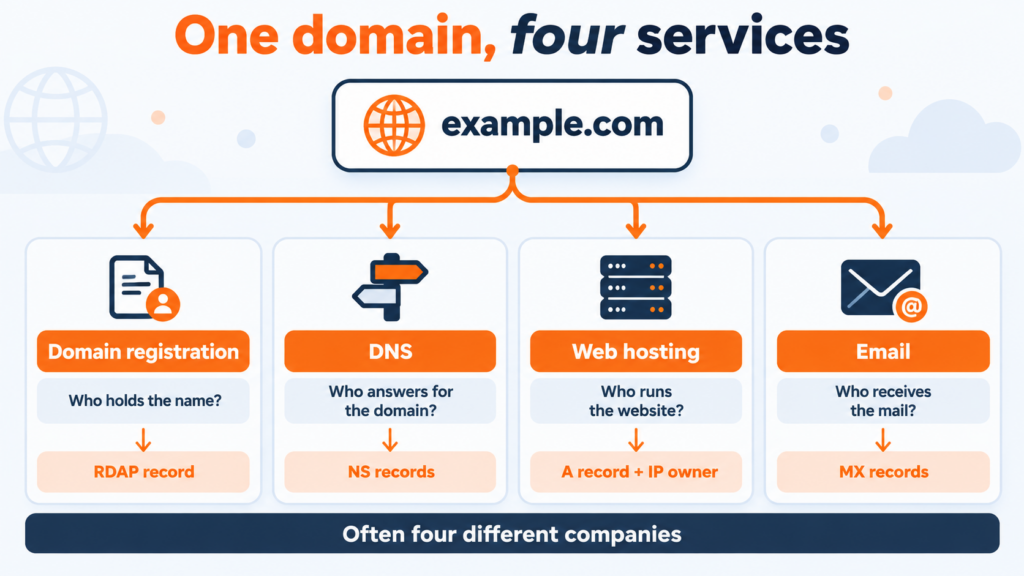
Hosting is only one of four services behind a domain, and they’re often four different companies.
| Service | What it does | Where it shows up | Examples |
|---|---|---|---|
| Domain registration | Holds the right to the name and renews it | RDAP record of the domain | GoDaddy, Namecheap, MarkMonitor |
| DNS | Tells the internet where the domain’s services are | NS records | Cloudflare, Amazon Route 53, the host itself |
| Web hosting | Runs the server that delivers the pages | A and AAAA records, and the IP owner | Hostinger, AWS, Shopify, Copahost |
| Receives and stores the domain’s mail | MX records | Google Workspace, Microsoft 365, the host’s mail server |
This matters most when you move a site. Switching hosts changes the web hosting and usually the DNS records. The registration can stay where it is, and the email only moves if it was at the old host. Our website migration checklist walks through the order that avoids downtime.,
How to find the host by hand
The checker does nothing you can’t do from a terminal. On macOS or Linux:
dig +short example.com A
dig +short -x 203.0.113.10
curl -s https://rdap.org/ip/203.0.113.10
dig +short example.com MX
dig +short example.com NS
The first command returns the site’s IP address; use it in place of 203.0.113.10 in the next two. The second asks for the address’s reverse DNS name. The third queries RDAP for the owner of the address: the organization name appears in the registrant entity of the JSON it returns. The last two show who handles the email and the DNS.
whois 203.0.113.10 also works on macOS and Linux, because the regional registries still answer WHOIS queries for IP addresses. On Windows, nslookup example.com gives the address, nslookup -type=mx example.com and nslookup -type=ns example.com give the mail and DNS servers, and opening rdap.org/ip/ followed by the address in a browser shows the owner. For more on server names, see our reverse DNS lookup.
What you can do with the answer
Report abuse. The checker shows the network’s abuse contact when the registry publishes one. That’s the address hosts monitor for phishing, spam and malware reports. For sites behind Cloudflare, use its abuse form instead.
Research a competitor, or a site you’re thinking of buying. The host, the email provider and the age of the domain say a lot about how a site is run. Our domain age checker shows the full registration record.
Find your own host. If you’ve lost track of where your site lives, the checker narrows it down, and the invoice in your inbox confirms it.
Confirm a move worked. After switching hosts, the checker should show the new one. If it still shows the old one, the DNS change hasn’t reached your resolver yet: check DNS propagation.
Moving to a new host
If the checker just confirmed your site is somewhere you’d rather not be, moving is mostly a matter of order: copy the site, test it on the new server, then point the DNS. For WordPress, our guide on how to migrate a WordPress site to a new host covers each step.
Copahost web hosting starts at €1.99 per month, with 24/7 technical support. Tell us where your site is today and we move your files, databases, email and domain for free.
See hosting plansFrequently asked questions
How do I find out who is hosting a website?
Look up the IP address the domain points to, then check who owns that address. The hosting checker on this page does both in one step, and also shows the site’s email provider, DNS provider and registrar. By hand, run dig or nslookup for the domain’s A record, then look the address up with RDAP or whois.
Why does a hosting checker say Cloudflare?
Because the site uses Cloudflare as a reverse proxy. Its DNS points to Cloudflare’s addresses, and Cloudflare fetches the pages from the real server behind the scenes, so the actual host is hidden from public DNS. The same happens with other CDNs and website firewalls, such as Fastly or Sucuri.
Can I find the real host behind Cloudflare?
Not reliably from public data. The domain’s own mail server sometimes hints at it, because mail usually isn’t proxied, but that’s a lead rather than proof. If you need the host to report abuse, use Cloudflare’s abuse form: Cloudflare forwards the complaint to the website operator and the hosting provider.
Is the domain registrar the same as the web host?
Often not. The registrar holds the domain registration and the host runs the server that serves the pages. Many hosts also sell domains, so they can be the same company, but a domain registered at one company pointing to a site hosted at another is very common.
How do I find out who hosts my own website?
Run your domain through the checker. If it shows a CDN or a cloud provider instead of a hosting company, search your email for invoices or welcome messages from your host: that account is where your site’s files live.
Can I see who owns a website, not just who hosts it?
Usually not. Since 2018, registries and registrars have hidden the owner’s personal details in most cases, so the public record shows the registrar but not the registrant. The registrar can often forward a message to the owner through a contact form.
What is RDAP?
The Registration Data Access Protocol, which replaced WHOIS. It returns registration data for domains and IP addresses in a structured format. ICANN ended the requirement for generic domains such as .com to provide WHOIS on 28 January 2025, so RDAP is now the official source.
Conclusion
Finding a website’s host comes down to one question: who owns the IP address the domain points to. For most sites the checker answers it directly. When a CDN or a cloud sits in between, the answer is the company in front, and the real host is something only the site owner, or an abuse report, can confirm. Either way, the same lookup tells you who handles the site’s email, its DNS and its registration, which is what you need to know before moving a site, reporting one, or just understanding how it’s put together.
